Best Patient Reactivation Tools for Dental Practices
Compare dental reactivation software by reply handling, booking workflow, pricing model, and Open Dental fit, with practical checks for your vendor demo.
Summary: Dental patient reactivation tools should be compared by what happens after a patient replies, not just by message delivery. This shortlist considers Clincy's Open Dental workflow, Viva AI's booking coverage, Recupra's outcome-based pricing, Elva's recall automation, Weave's communications platform, and the non-digital outreach questions to resolve for Lighthouse 360. Choose based on your practice management system, campaign needs, evidence of the proposed booking workflow, and who will manage patient responses.
The standard advice is to buy a recall platform, load your overdue list, and let the reminders run. But consider what happens when a patient replies. A text asking "ready to get back on track?" can land in a shared inbox without anyone owning the answer. For a front desk already covering phones, check-ins, and today's schedule, sending the message is only part of the job.
Patient reactivation tools differ on exactly that point: the shortlist should distinguish reminder delivery, conversation handling, booking, and outcome-based billing. The right pick depends on whether your practice runs Open Dental, which lapsed patients you want to reach, and who on your team answers when a patient says yes. In this article, PMS means practice management system: the software holding your patient records and appointment schedule. A cohort is a selected patient group. An adapter is the software connection to the PMS; write-back means saving an outcome in that system.
How to read this comparison: This is a workflow-focused buying guide for independent dental practices, not an independently tested league table. Clincy is the tool this site builds and appears first because of that relationship, not because a comparative trial established it as the winner. The other entries describe different buying considerations; their order does not establish superiority. Vendor documentation and linked comparisons are starting points for a demonstration, not proof of results in your practice.
1. Clincy: AI reactivation built around Open Dental
Clincy's published workflow centers on approving outreach rules and deciding who handles patient replies, with a separate walkthrough for Open Dental. Evaluate it for dental patient reactivation and unscheduled treatment follow-up by asking how a patient's history and the practice's scheduling rules affect the message. Have the demonstration distinguish a scheduling request, a callback task, and a staff question rather than treating every reply as a completed booking.
The workflow is built to be reviewed before it touches a patient. You approve the patient group and exclusions with a named front office member, choose the channel, and agree in advance how replies route.
Clincy's published evaluation steps include showing who receives a callback request and how an outside booking stops further attempts. Also confirm where attempts and outcomes appear in Open Dental. That last check matters because an outreach log and a patient record are not necessarily the same thing. Ask where the contact history is stored, whether staff can see it in their normal workflow, and how the team avoids maintaining conflicting lists.
The trade-off to establish is scope: a focused reactivation workflow may not replace an established communications suite. Confirm Clincy's current rollout status, supported channels, insurance filtering, and booking permissions rather than assuming that a walkthrough describes every available feature. For an Open Dental practice considering automated outreach on overdue recall and open treatment plans, evaluate an isolated, approved group of records and compare booked visits with spend. Agree on the evaluation period and success criteria before starting rather than treating an arbitrary trial length as evidence of effectiveness.
You can see the full patient flow on the patient reactivation workflow page, and the Open Dental reactivation walkthrough covers the integration mechanics.
2. Viva AI: compare booking with broader front-desk coverage
Viva AI belongs on the shortlist when direct booking and broader receptionist coverage matter: the eesel AI comparison linked below describes booking into Dentrix, Eaglesoft, and Open Dental. That is a secondary account, so confirm the exact integration and permissions for your installation.
For reactivation specifically, ask the vendor to demonstrate outbound outreach and the return journey when a patient calls back. Establish which of calls, texts, emails, and web chat are included in the proposed plan, which languages are supported, and whether the assistant shares conversation history across those channels. Do not assume that a booking integration also creates patient charts or handles every outbound campaign.
The eesel AI comparison lists Viva AI from $349 per month, but a headline starting price is not a practice-specific quote. Ask for the current plan terms, included usage, provider charges, and any overage rules in writing. Who it is for: practices evaluating broader receptionist coverage alongside reactivation and willing to compare the complete workload rather than only the advertised entry price.
The cost question is how the proposed plan behaves under your actual usage. Ask whether outbound attempts, unanswered calls, inbound callbacks, and messages consume the same allowance, and whether transfers continue to incur charges. If reactivation is your only goal, separate the cost of that workflow from receptionist features you would not otherwise buy. A written scenario based on your own call and message records is more useful than a generic worked example.
3. Recupra: pay only when the patient comes back
Recupra presents its reactivation service as an outcome-based way to bring dormant patients back into care. Its pricing page lists $40 per dormant patient reactivated, with no platform fee or setup fee. Before comparing that model with a subscription, establish what qualifies as a reactivation and what evidence triggers billing. Ask the demonstration to show the conversation, the appointment slot, and the resulting record rather than assuming that a patient expressing interest counts as a completed return.
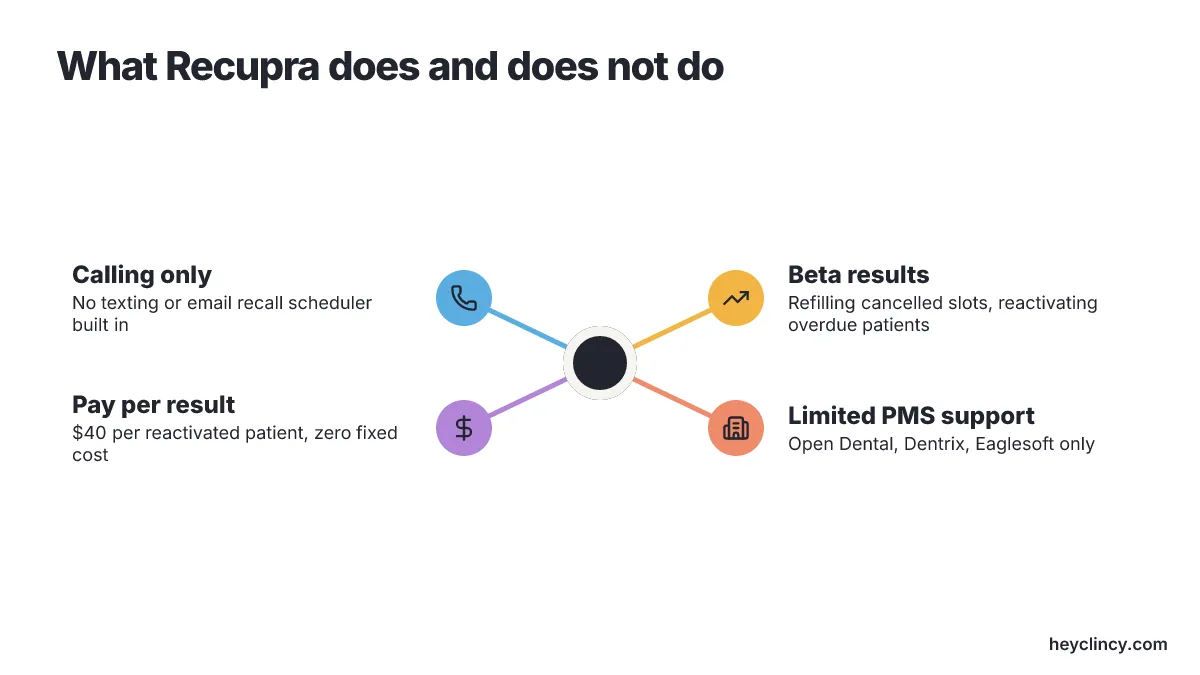
The boundary to establish is whether Recupra replaces an existing recall workflow or works alongside it. Ask which outreach channels are included, how an unanswered call is handled, and how duplicate outreach is prevented when the PMS is also sending reminders. Treat vendor case studies as vendor-reported evidence, not a forecast for your overdue list. To evaluate any reported result, request the starting cohort, exclusions, definition of success, and whether the patient actually attended rather than merely booked.
Who it is for: practices interested in outcome-based pricing and prepared to confirm the supported connection before onboarding. Ask specifically about your PMS version, whether an adapter is already available, and which work remains manual. A statement that a vendor can connect to a system should not substitute for a demonstration of patient matching, scheduling permissions, and a usable outcome log.
The exception to watch is volume: per-result pricing can exceed a flat subscription when enough billable results accumulate. It can also leave unanswered questions about cancelled appointments, repeat patients, and refunds. Compare the expected billable outcomes under the contract with the complete subscription alternative, including staff time and any usage charges. Do the volume math using the same definition of a successful return before signing.
4. Elva: evaluate recall automation and follow-up controls
Elva describes AI recall and reminders as part of its dental workspace, making follow-up automation the central feature to evaluate here. Ask it to show how patients become eligible, which channels a sequence uses, and when staff take over. Rather than relying on an assumed default cadence, review the actual sequence proposed for your practice and confirm which steps can be changed or disabled.
For lapsed patients, ask whether reactivation uses a separate workflow from routine recall. Have the vendor build a sample group from an approved test record, explain the eligibility rules, and show the exclusions alongside the resulting list. If a plain-language request can build a cohort, review the generated filters rather than assuming the request was interpreted exactly as intended.
Elva's site names Dentrix, Dentrix Ascend, Open Dental, Eaglesoft, Curve Dental, Denticon, and CareStack among its PMS integrations. Confirm the scope of your connection rather than reading that list as proof of real-time synchronization. In particular, demonstrate what happens after a patient books through another route, how quiet hours and contact limits are configured, and how staff check message details against the chart before outreach starts.
Who it is for: practices evaluating separate follow-up rules for hygiene, periodontal maintenance, and lapsed patients whose overdue list is not worked consistently. Obtain current pricing and a written description of the included workflows before comparing Elva with a flat-price alternative. Ask whether setup, additional channels, and staff handoffs change the cost. Without comparable terms, a feature-rich demonstration does not tell you which option fits the budget.
5. Weave: assess reactivation within your communications setup
Weave's dental platform advertises phones, texting, online scheduling, and other patient-communication features. The buying question is whether adding reactivation to that environment is simpler than introducing another system. Ask how its patient lists connect to your PMS, where replies appear, and whether staff can manage those replies in the inbox they already use. Obtain the current plan and messaging allowances rather than relying on unsourced tier prices.
The limitation to test is campaign segmentation: can the proposed setup distinguish overdue hygiene from outstanding treatment, and can staff inspect the filters before sending? Do not assume that every patient on a win-back list should receive the same message. US Tech Automations estimates the full Weave suite at $500–$800 per month; that is a secondary estimate, not a current vendor quote. For Open Dental, verify the connection method, permissions, and supported workflow directly rather than treating the word integrated as a guarantee.
Who it is for: practices already running Weave for phones and reminders, where adding win-back campaigns is an extra feature rather than a new platform. If you are not on Weave today, buying it just for reactivation means paying for a phone system you may not want.
6. Lighthouse 360: verify the non-digital outreach option
Lighthouse 360 is the entry to investigate if non-digital outreach is important to your shortlist, but postcard availability and campaign details need current confirmation. Do not buy it on the assumption that an older description of email, text, and mailed follow-up still describes the package being sold. Ask for the current channel list, supported PMS connections, mailing process, and reporting view. Treat any claim of wider reach than competing products as unproven without comparable delivery data.
The limitation to test is personalization. Ask which patient fields a template can use, which fields require staff review, and whether the proposed integration can distinguish routine recall from outstanding treatment. A demonstration should show the actual approved wording, not just a list of merge fields. Check that a mailed message can be stopped or excluded when another outreach channel has already produced a booking.
No verified current price is established here. Request the package price, mailing charges, included volume, and any contract requirements from the seller. The Lighthouse website resolved during this review, so a claim that its site no longer resolves should not guide a purchase. Confirm the current product name, contracting entity, and sales route directly; an unlinked comparison is not enough to establish whether a package is standalone or bundled.
Who it is for: practices investigating a non-digital option for lapsed patients who cannot be reached through their available digital channels. First establish that the current package actually provides the required mailing service. If your overdue list mostly has usable phone numbers and email addresses, compare the incremental value of mail with its extra cost rather than assuming that another channel is always better.
How do the booking workflow, integration, and price compare?
Compare the tools by where a booking lands, what the PMS connection actually does, and which charges apply to your workflow. The table separates available evidence from questions still requiring a demonstration; a vendor being on the shortlist is not confirmation that every capability is available in your configuration.
| Tool | Evidence to start from | Open Dental check | Pricing evidence | Main evaluation question |
|---|---|---|---|---|
| Clincy | Published outreach and reply-ownership workflow | Walkthrough available; demonstrate the actual connection | Obtain current terms | Does the reply become a request, task, or confirmed booking? |
| Viva AI | Booking described in the linked eesel AI comparison | Secondary source names Open Dental; confirm your version | From $349/month in eesel AI's comparison; confirm current terms | Which receptionist and outbound features are included? |
| Recupra | Vendor describes outcome-based reactivation | Confirm adapter availability and write-back | Vendor lists $40 per dormant patient reactivated | What event triggers billing, and how is it audited? |
| Elva | Vendor advertises recall and reminders | Vendor names Open Dental; confirm supported operations | Obtain current terms | Can staff inspect eligibility and stop further outreach? |
| Weave | Vendor advertises phones, texting, and scheduling | Demonstrate your proposed workflow | Secondary full-suite estimate of $500–$800/month, not a quote | Does it reuse your current inbox and communications setup? |
| Lighthouse 360 | Current mailing and campaign scope unconfirmed here | Confirm current support directly | Obtain package and mailing terms | Is non-digital outreach currently available and useful for your list? |
Use these checks in a demonstration rather than accepting an integration badge as proof:
- Connection method: Ask whether the tool reads and updates the PMS directly or relies on a spreadsheet export. Specify which records can change and how staff detect a failed update.
- Stop condition: Show an appointment booked outside the outreach conversation and verify what happens to the remaining sequence. Include a cancelled booking and an opt-out in the test so the team can inspect those paths too.
- Visible ownership: Open the callback task or unresolved question from a staff account. Confirm that the responsible person can see the context without searching across disconnected inboxes.
If you are weighing the channels before the vendors, the voice versus SMS comparison for dental reactivation breaks down where each one wins, and the reply-handling guide covers what to do when the patient answers with a question instead of a yes. For the message itself, start from the Clincy dental patient reactivation scripts rather than writing from scratch.
When is the native recall workflow enough?
Your native recall workflow may be enough when staff can review the list, make appropriate contact, and manage replies consistently without another platform. A small overdue list alone does not establish that automation will save money. Compare the actual work with the proposed subscription and usage charges before assuming that software is the cheaper choice.
For Open Dental, ask your administrator to demonstrate the recall or reactivation workflow already available in your installation. Check the eligibility filters, contact-history view, exclusions, available communication options, and controls on repeat contact. This article does not verify the exact native-tab behavior for your version, so use that demonstration as the baseline against which an added tool must justify itself.
For practices seeking to increase patient retention, the evaluation question is whether preparing messages, following up, and managing replies consumes enough staff time to justify an additional workflow. Do not pay for another view of the same list without understanding how it changes the work.
The line is practical: if your team works the recall list when the schedule is thin but abandons it when the schedule is full, evaluate whether automation addresses that specific gap. If your team already works the list consistently, compare the native workflow and better scripts before committing to another platform. The priority may instead be increasing patient retention among the patients who are still coming.
For this comparison, distinguish routine recall from reactivation of a lapsed patient. A routine cleaning reminder and a message about an outstanding treatment plan serve different administrative purposes; that distinction does not establish a clinical recall interval or prove that a particular message will perform better. Have the practice define the groups and approve the wording. Keep the lists and exclusions visible in whichever tool you choose.
What should the vendor demonstration prove?
The demonstration should prove how an eligible record becomes an approved message, a handled reply, and an accurately recorded outcome. Start with the demo checklist, not the pricing page. Pick a vendor from the shortlist, request a demonstration on an approved test record, and inspect:
- How a patient becomes eligible and who approves the cohort.
- How exclusions and communication preferences apply.
- What the outgoing message says and which chart fields it uses.
- Who receives a callback request or a question the assistant cannot answer.
- How an outside booking affects the remaining sequence.
- Where the attempt, reply, and outcome appear in Open Dental.
Assign an owner to the reply queue before outreach starts. Ask that person to complete a callback task during the demonstration rather than accepting a screen showing that the task exists.
What this list does not settle is call quality. Nobody here has run these tools on your practice's line, and the differences in how a conversation sounds, and how a patient in your community responds to it, only show up in your own pilot data. For a deeper look at the Open Dental side of the decision, the best Open Dental patient reactivation software comparison walks the integration options in more detail, and if your practice also needs visibility in search results while you work the list, ClinAds handles website, practice-owner content, link building, and SEO for dental practices.
What should your team verify before approving outreach?
Approve the patient group, message content, access permissions, and reply-routing rules before allowing a campaign to use live records. This is an operational evaluation checklist, not a claim that any product automatically satisfies your practice's privacy or compliance obligations.
- Patient selection: Review the proposed group with a staff member who understands the records. Confirm how the system handles active appointments, records flagged against contact, and uncertain patient matches. A readable count is not enough; staff need to understand why a record was included.
- Communication preferences: Ask where preferences are stored, who can change them, and how a change reaches every active campaign. Test the behavior with an approved example rather than assuming that an unsubscribe in an inbox updates the patient record.
- Access and data handling: Request the vendor's current documentation on access roles, retention, deletion, and incident handling. Have the appropriate reviewer assess the proposed arrangement. Use approved test data for the demonstration and agree on what live information, if any, is necessary for evaluation.
- Human escalation: Define which replies need a person, where those replies appear, and who covers the queue when its usual owner is unavailable. Keep administrative scheduling separate from clinical questions; a booking demonstration should not be taken as evidence that the assistant can assess symptoms or recommend treatment.
- Outcome evidence: Separate attempted contacts, answered conversations, booking requests, confirmed appointments, and attended visits in the evaluation. Decide which outcome matters before reviewing a vendor's results. For an outcome-based contract, make the reporting definition agree with the billing definition.
Keep a written record of the demonstration and the unresolved questions. That makes the comparison useful to the front desk after the sales meeting and gives the person approving the purchase a clear distinction between observed behavior, vendor statements, and features still awaiting confirmation.
Frequently Asked Questions
What should I look for in patient reactivation tools for a dental practice?
The key difference is what happens when a patient replies. Some tools send reminders and leave staff to handle the response, while others manage the conversation or book an appointment. Compare the tool with your practice management system, the campaigns you need, and who will own patient replies. The article also recommends testing outreach on an isolated group and measuring booked chairs against spend.
Which patient reactivation tools work with Open Dental?
Clincy publishes an Open Dental workflow walkthrough, and Elva's site names Open Dental among its integrations. The linked eesel AI comparison also describes Viva AI booking into Open Dental. Confirm the supported version, connection method, scheduling permissions, and outcome logging for the product you are considering. For Recupra, establish adapter availability directly rather than assuming an onboarding promise is a ready-made integration.
How much do patient reactivation tools cost for dental practices?
Pricing differs by contract: Recupra lists $40 per dormant patient reactivated with no platform or setup fee, while eesel AI lists Viva AI from $349 per month. These are different billing models, not equivalent quotes. Obtain current terms for the other shortlisted products and compare setup, usage, included channels, contract obligations, and the definition of a billable result.
Which patient reactivation tools can respond to patients and book appointments?
The linked eesel AI comparison describes Viva AI booking directly, and Recupra markets its service around bringing dormant patients back into care. Neither statement proves every proposed conversation ends with a confirmed appointment. For each product, demonstrate the difference between a booking link, a scheduling request, a staff callback, and a written appointment in the PMS. Verify who handles questions that prevent booking.
What limitations should I consider when choosing patient reactivation tools?
The main limitations to test are incomplete integration, unclear reply ownership, unsuitable contact rules, and costs that do not match your usage. Clincy's rollout scope, Recupra's available adapters, Elva's sequence controls, Weave's segmentation, and Viva AI's included features all require confirmation for the proposed setup. This article does not establish comparative call quality or guarantee additional booked visits. Ask for evidence of the workflow you actually plan to use.
Related reading
- 1 Best Open Dental Patient Reactivation Software
- Voice vs SMS for Dental Patient Reactivation 2026
- 6 Best 6 AI Vendors for Dental Treatment Reactivation
- How to Handle Replies to Dental Reactivation Texts
Sources
Clincy keeps treatment conversations moving with personalized texts, human support, and scheduling in your practice management system.
Book CallMore from the blog
6 Dental Reminder Text Tools and Templates for Front Desks
Compare six dental reminder template sources by timing, reply handling and Open Dental fit, with a front desk checklist for reducing duplicate outreach.
6 AI Answering Services for Florida Multi-Site Practices
Compare six Florida AI answering services for multi-location practices, with handoff checks, booking risks and reactivation fit for dental teams.