6 Dental Reminder Text Tools and Templates for Front Desks
Compare six dental reminder template sources by timing, reply handling and Open Dental fit, with a front desk checklist for reducing duplicate outreach.
Summary: The best dental reminder texts state the appointment time, ask for a clear next step such as replying C to confirm, and direct rescheduling requests to a front-desk call rather than promising a slot. Use separate advance and near-visit wording, and decide who monitors replies and records outcomes in Open Dental. For text and email, keep each channel’s purpose distinct.
The usual advice says to pick a friendly dental appointment reminder text and send it before the visit. That advice breaks down at a busy front desk because the wording is only one part of the work.
Replies still need an owner. Schedule openings still need judgment, and Open Dental still needs a clean result after the patient answers.
The best template is not the friendliest wording. It is the one that tells the patient exactly what to do next and tells the team exactly what happens when the patient replies. A dentist confirmation text that says "reply C to confirm" helps only if someone watches the reply, handles the callback, and records the result before another staff member sends a duplicate message.
Appointment reminders need a different workflow from reactivation and unscheduled treatment follow-up. The front desk needs short dental reminder messages for booked visits, separate dental recall reminder messages for overdue patients, and a handoff rule when the patient asks a treatment question instead of confirming the appointment.
Which reminder source fits your front desk workflow?
Choose a source by the writing task your front desk needs to solve: reminder timing, channel wording, confirmation handling, or a rescheduling response. The comparison below is an editorial guide to the linked resources, not a ranking based on measured attendance improvements or an Open Dental integration test.
| Template source | Writing task to review | Front desk decision before using it |
|---|---|---|
| NexHealth | Advance and near-visit reminder wording | Decide how reminder timing changes the action requested. |
| Quo | Text and email wording | Give each channel a purpose instead of duplicating outreach. |
| Practice by Numbers | Automated reminder examples | Match each candidate message to an appointment situation. |
| Etisia | SMS appointment reminders | Decide who will monitor and resolve incoming replies. |
| Elva | Reminder and confirmation wording | Define what counts as a confirmation versus a question. |
| CentriWeb | Confirmation and rescheduling examples | Adapt rescheduling language so it does not promise unchecked availability. |
Treat a useful template and a working integration as separate decisions. Before enabling a message in your own system, confirm how replies reach staff, which appointment record they belong to, and whether a person or an approved automation changes the status. A template resource alone does not establish those capabilities for your configuration.
1. NexHealth: one-week and 24-hour reminders
NexHealth reminder templates work well for front desk teams that want timing examples built around a one-week reminder and a 24-hour reminder. The page helps when a practice wants early planning kept apart from last-day confirmation, because those messages do different work in the schedule.
An advance dentist appointment message should invite the patient to confirm or flag a scheduling problem while staff can still review alternatives. An illustrative version would say: Hi [Patient first name], this is [Practice name]. Your dental appointment is [Appointment date] at [Appointment time]. Reply C to confirm or call [Office phone] if that time no longer works.
Keep a near-visit version focused on confirming attendance or asking the front desk for help with a change. Neither version should imply that replying to a text automatically books a replacement appointment.
The earlier message can make a change visible while the team still has time to contact another patient about the opening. The later message can focus on whether the patient is coming as scheduled, instead of asking for details the front desk cannot resolve by text. Keep the two jobs separate in the template names, so staff can tell which message they are reviewing before sending it.
NexHealth works best as a starting point for practices that already know who handles replies. The template timing gives structure, but the front desk still needs a rule for who watches confirmation replies during check-in rushes.
2. Quo: text and email reminder wording
Quo appointment reminder templates suit teams that still use both text and email for booked dental visits. The source offers dental appointment reminder templates for text and email, so it helps practices that want a consistent message across more than one communication channel.
A front desk should treat text and email as different jobs, not duplicated blasts. A text should ask for a fast reply, while an email can carry longer details such as parking notes, arrival instructions, or insurance reminders. A patient who receives the same dentist appointment message twice with no reason may ignore both, so channel choice should be part of the template decision.
For example, a text can state the appointment time and ask the patient to confirm, while an email can include the same time alongside any arrival information the practice has chosen to share. The team should check that the action request is still obvious in both versions. If an email contains several details, put the confirmation instruction where a patient can find it without reading the message as a block of text.
Quo is most useful when a practice wants one voice across messages without building every line from scratch. The next decision is whether the practice needs simple confirmation wording or a fuller automated reminder set.
3. Practice by Numbers: automated reminder examples
Practice by Numbers templates give practices a set of practical examples for automated dental appointment reminders. Use the source as a reminder-workflow reference, then check whether its examples match the appointment situations your front desk actually handles. A collection of examples is a starting point for review, not evidence that every message belongs in your sending sequence.
Avoid introducing every candidate message at once. Choose wording for confirmation, a rescheduling request, and a final reminder, then keep the wording steady long enough for the team to learn what each reply means. If every message changes at the same time, it gets hard to tell whether missed confirmations come from timing, wording, or who owns the reply.
Before a set is adopted, label each candidate by the appointment situation it handles. A template for a patient who has not confirmed should stay separate from one for a patient who asked to move the visit. That separation gives staff a way to pick a message by purpose, instead of trying to remember which wording was meant for which reply.
Practice by Numbers works best when a team wants a template bank rather than one reminder line. The office manager still has to decide which template fits the appointment status inside Open Dental.
4. Etisia: SMS reminders for dental practices
Etisia SMS reminders suit front desks that want to focus on SMS appointment reminders for dental practices. That narrower SMS focus helps when phone calls and email already have separate workflows, and the missing piece is a clean text reminder for booked visits.
An SMS reminder should not try to do too much. A good dental reminder text asks for one clear action, uses the patient's appointment time, and keeps patients out of a vague inbox. An illustrative message could say: Hi [Patient first name], this is [Practice name]. Your dental appointment is [Appointment date] at [Appointment time]. Reply C to confirm or R if you need a call about rescheduling. This gives the coordinator a defined reply to review rather than an assumed appointment change.
The team should test the wording against the replies it invites. If "R" means a staff member must call, the message should not imply that the patient already changed the appointment. If the patient sends a reply the template did not expect, the front desk needs a path for reviewing it rather than treating it as a completed confirmation.
Etisia is most useful for teams that want SMS wording without widening the project into every patient communication channel. The next risk is confirmation handling, because a short text creates work the moment a patient replies.
5. Elva: confirmation text templates and timing
Elva reminder templates fit practices that want both appointment reminder wording and confirmation text examples. The source shares dental appointment reminder and confirmation text templates, which helps when a practice wants the reminder to produce a clear status instead of a vague "thanks."
A confirmation template should create a schedulable outcome. Reply C to confirm works because the reply can be recorded as confirmed, while let us know if you have questions invites a mix of clinical, insurance, and timing replies that different people may read differently. A front desk coordinator should know whether yes, "C," and "confirmed" all count the same before the message goes out.
Write down how the team will classify replies that use different words. A patient may answer in a sentence rather than using the requested letter, and the staff member handling that reply needs a steady way to separate a confirmation from a question or a request to reschedule. That decision belongs in the workflow, not in an individual coordinator's memory.
Elva is most useful when confirmation behavior matters as much as the reminder itself. A practice that has frequent unanswered replies should pair these templates with a written callback rule.
6. CentriWeb: confirmation and rescheduling messages
CentriWeb reminder messages work as a wording reference for front desk teams that want plain confirmation and rescheduling examples. A request to move a visit needs a different response from a confirmation. Review the examples for those separate situations, and adapt the reply wording to the way your own office checks availability.
Do not promise an open chair inside an automated text. Front desk staff can avoid promising availability with illustrative wording like: Hi [Patient first name], this is [Practice name]. Your dental appointment is [Appointment date] at [Appointment time]. Reply C to confirm or R for a call about other available times. Sending them toward a call gives the coordinator time to check the right provider, room, appointment type, and procedure length before offering a slot that actually works.
A request for a different day is only a preference. It does not count as a finished change.
Keep the original visit on the calendar until someone on staff speaks with the patient, finds a workable slot, and updates the system by hand. Clear the spot too early, and the team may think the change is settled while the patient is still waiting on options. CentriWeb fits practices that care about the follow-up after a cancellation, so the next step is choosing scripts that match how the reception desk handles daily calls.
What reminder wording can the front desk adapt?
Use appointment-specific wording that names the practice, identifies the booked visit, and makes the requested action clear. These are illustrative scripts adapted from the workflow advice in this article, not patient records, vendor quotations, or a claim that a particular reply will update your scheduling system automatically.
Replace the bracketed fields with approved appointment details before sending. Only offer a reply option your team actually monitors, and use the practice's approved consent and opt-out wording rather than treating these examples as a complete compliance template.
Booked-visit confirmation request
A confirmation request should identify the booked visit and tell the patient how to confirm or flag a scheduling problem.
Hi [Patient first name], this is [Practice name]. Your dental appointment is [Appointment date] at [Appointment time]. Reply C to confirm, or call [Office phone] if that time no longer works.
Use this only when the appointment details have been checked against the current schedule. If the patient responds with a question instead of a confirmation, assign that reply for review rather than marking the visit confirmed.
Callback request for rescheduling
A rescheduling prompt should request a callback without implying that the original appointment has already moved.
Hi [Patient first name], this is [Practice name] about your dental appointment on [Appointment date] at [Appointment time]. Reply C to confirm or R if you need a call about rescheduling. A new appointment time is not confirmed by replying R.
Use this version only if staff can monitor R replies and follow through. The coordinator should check the provider, appointment type, and available time before offering a replacement visit.
Confirmation acknowledgment
Send a confirmation acknowledgment only after the patient's reply has been matched to the correct appointment and recorded.
Thanks for confirming, [Patient first name]. We have your dental appointment with [Practice name] recorded for [Appointment date] at [Appointment time].
Do not use the acknowledgment for an ambiguous reply or an unresolved scheduling request. If the patient asks a treatment or insurance question, keep that question visible for the appropriate staff member instead of treating it as a completed confirmation.
Reply to a request for a different appointment time
A rescheduling reply should acknowledge the request while keeping the replacement time unconfirmed until staff check availability.
Thanks, [Patient first name]. We received your request to change your appointment with [Practice name]. The front desk will check available times and call you to discuss options. A replacement appointment is not confirmed yet.
Use the callback promise only when someone owns that follow-up. Handle an explicit cancellation under the practice's approved cancellation process rather than assuming every cancellation is merely a request to move the visit.
How should a front desk choose a reminder template?
A front desk should pick the template that fits the next step, not the one that merely sounds polished. A booked hygiene visit needs a confirmation message. An overdue recall patient needs a different note, one that asks whether the patient wants to schedule at all. Practices looking for dental recall reminder messages should keep those apart from appointment reminders, so the coordinator can tell whether the patient is confirming an existing visit or starting care again.
The practical way to choose starts with the appointment status in Open Dental. Use one message for already booked appointments, one for overdue recall, and one for unscheduled treatment follow-up. If a front desk mixes those groups, the replies will look alike on the phone and mean different things in the schedule.
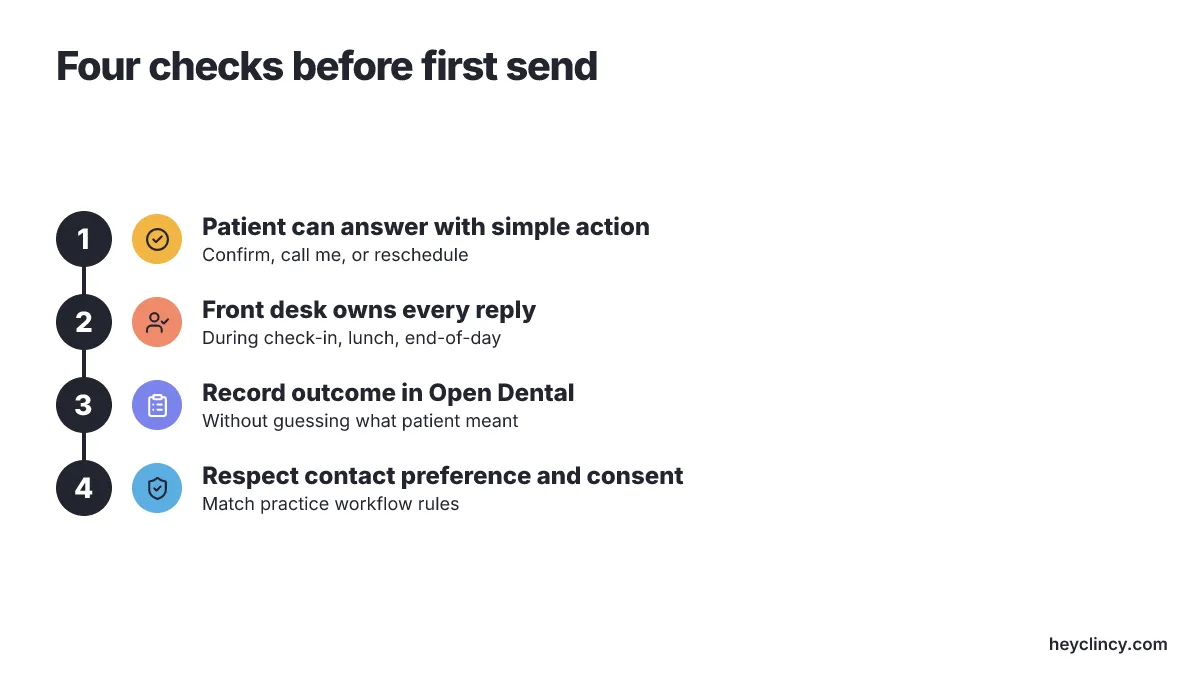
A good reminder template should pass four checks before the first send:
- The patient can answer with a simple action, such as confirm, call me, or reschedule.
- The front desk knows who owns every reply during check-in, lunch, and end-of-day closing.
- The coordinator can record the outcome in Open Dental without guessing what the patient meant.
- The message respects contact preference, opt-outs, and the practice's consent workflow.
A short staff walkthrough can expose gaps before a message reaches patients. Put a proposed reminder beside several likely replies, including a confirmation, a request to reschedule, and a question about treatment. Ask the assigned coordinator what happens next for each one, and where the outcome gets recorded.
If staff members give different answers, revise the workflow before changing the template.
A template library may add little for a small practice where the same coordinator already calls booked patients and records the outcomes reliably. That office may only need a short script for missed calls and a shared rule for logging results, because another message queue would create more monitoring work than scheduling lift.
Build a compliance review into the template decision rather than treating example wording as legal guidance. The linked FCC source document is a reference for the practice's reviewer, not a substitute for checking which requirements apply to its messaging program. Before changing message flows, ask the reviewer to approve the consent process, opt-out wording, and how staff stop further outreach. Do not assume that a confirmation reply authorizes unrelated messages.
Reply ownership deserves its own place in the reminder workflow. A patient who replies I need to move it has not rescheduled, and a patient who replies Is my crown covered? has moved from appointment confirmation into treatment or insurance handling. A written handoff rule, like the one in a reply handling process, keeps those messages from sitting between the scheduler and treatment coordinator.
Clincy is building AI calls and texts for dental patient reactivation and unscheduled treatment follow-up, with Open Dental as its initial pilot focus. The useful distinction for front desk teams is that appointment reminders protect visits already on the schedule, while patient reactivation workflows deal with patients who stopped scheduling and need a different follow-up path.
Template wording should also match the kind of demand the practice is trying to create. ClinAds is a dental and medical clinic marketing agency, an AI-powered marketing team for dental and medical clinics that builds, manages, and optimizes campaigns to book patients and improve local visibility. Reminder texts are not a substitute for that acquisition work, because reminders convert existing appointments into confirmed next steps rather than creating new patient demand.
Front desk teams that want more examples should separate appointment reminders from broader dental office text messaging templates. A booked-visit confirmation can stay short, while reactivation scripts need context about how long the patient has been overdue, whether treatment is unscheduled, and who should make the callback. For recall and overdue patients, a separate set of Clincy patient reactivation scripts gives the coordinator wording that does not confuse an unscheduled patient with a confirmed appointment.
The best operating test is simple: send the message to one real workflow on paper before turning it on. Write the template, write every likely reply, assign the owner, and decide exactly what Open Dental status changes after each reply. If the team cannot complete that exercise, the template is not ready for patients.
Put reminder wording and reply ownership into practice
Start with the next booked appointments, not the oldest recall list. Pick one dentist confirmation text, assign one person to watch replies during the workday, and decide how confirmations, reschedule requests, and callbacks get recorded in Open Dental.
A useful template takes less writing skill than discipline. The front desk needs a message patients understand, a reply rule the team follows, and a cutoff point where a text becomes a phone call or coordinator handoff. After the booked-appointment workflow is stable, build separate wording for overdue patients and unscheduled treatment so dental reminder messages do not turn into another queue nobody owns.
Frequently Asked Questions
What should a dental appointment reminder text say to get a clear confirmation?
A good dental reminder text states the patient’s appointment time and asks for one clear next step, such as replying C to confirm. It should direct a patient who needs to reschedule to call the front desk rather than imply that a new slot is already booked. Keeping the action simple also makes replies easier for staff to classify and record.
How should front desks word one-week and 24-hour dental reminders differently?
A one-week reminder gives patients advance notice to confirm or request a change. A 24-hour reminder can focus on the upcoming visit; choose its wording to match the action your front desk can handle. Keep the two messages separate in the template names so staff can identify which reminder they are reviewing before sending it.
What should a dental front desk do when a patient asks to reschedule by text?
The text should direct the patient to call the front desk or request a call about other available times, rather than promise an open appointment slot. A requested day is only a preference, not a completed change. Keep the original visit on the calendar until staff speak with the patient, find a workable time, and update the system by hand.
How should dental teams handle replies to appointment reminder texts in Open Dental?
Decide in advance who monitors replies, including during busy periods such as check-in rushes, and who records the outcome in Open Dental. Set a consistent rule for whether replies such as “yes,” “C,” and “confirmed” all count as confirmation. Staff also need a way to distinguish a confirmation from a question or rescheduling request so the appointment status is recorded correctly.
Should dental offices send the same appointment reminder by text and email?
Treat text and email as separate channels with distinct purposes rather than sending duplicate messages without a reason. A text can state the appointment time and ask for a fast confirmation reply. An email can include longer details, such as parking notes, arrival instructions, or insurance reminders. Keep the confirmation request easy to find in both versions, even when the email contains more information.
Related reading
- 6 Best Dental Reactivation Scripts for Front Desk Staff
- How to Handle Replies to Dental Reactivation Texts
- Effective Dental Office Text Messaging Templates
- 2 Best Dental Appointment Recall Tools to Compare
- Relocating for a Dental Role: Planning Your Move
- Alternatives to job boards for finding dental roles
Sources
Clincy keeps treatment conversations moving with personalized texts, human support, and scheduling in your practice management system.
Book CallMore from the blog
6 AI Answering Services for Florida Multi-Site Practices
Compare six Florida AI answering services for multi-location practices, with handoff checks, booking risks and reactivation fit for dental teams.
Top Dental Recare Systems for Practice Management
Compare four dental recare systems (Open Dental, Dentrix, Eaglesoft, Curve Dental) by integration, two-way SMS and recall tracking, plus how to choose one.