Text Messaging for Dentists: 6 Recall Tools Compared
Compare top dental texting tools for recall efficiency, focusing on chart context, patient history, and real-time replies. Check SMS fees and TCPA updates.
Summary: Text messaging tools for dentists should prioritize effective reply handling over message volume. The strongest options integrate with patient records, ensuring that replies are contextually relevant and actionable, which helps prevent losing patients at critical booking moments. Key features include maintaining patient history, real-time communication, and seamless integration with existing dental practice management systems.
A hygiene recall blast sends fifty outbound messages at nine in the morning. At the same time, the front desk is checking in the first arrival, handling an incoming billing call, and confirming tomorrow's crown prep. One patient replies at once and asks for an afternoon opening, but the notice lands in an unassigned browser tab that no one watches during morning check-in. By lunchtime, the chair is still open because nobody took ownership of the reply before the patient moved on.
Evaluating text messaging for dentists means looking past message count and asking what happens to the replies. Big blast numbers look good on sales decks, but clinic revenue depends on whether patient responses connect to the chart, move cleanly through handoffs, and write the confirmed outcome back into the practice management system. Front desk teams do not have trouble hitting send on recall lists. They have trouble handling the stream of replies that follows.
A texting tool that creates a separate inbox adds friction at the exact moment a patient decides to accept care. The review below ranks platforms by workflow fit, visible patient history, and day-to-day use, not by marketing promises.
1. Archy: chart context for recall replies
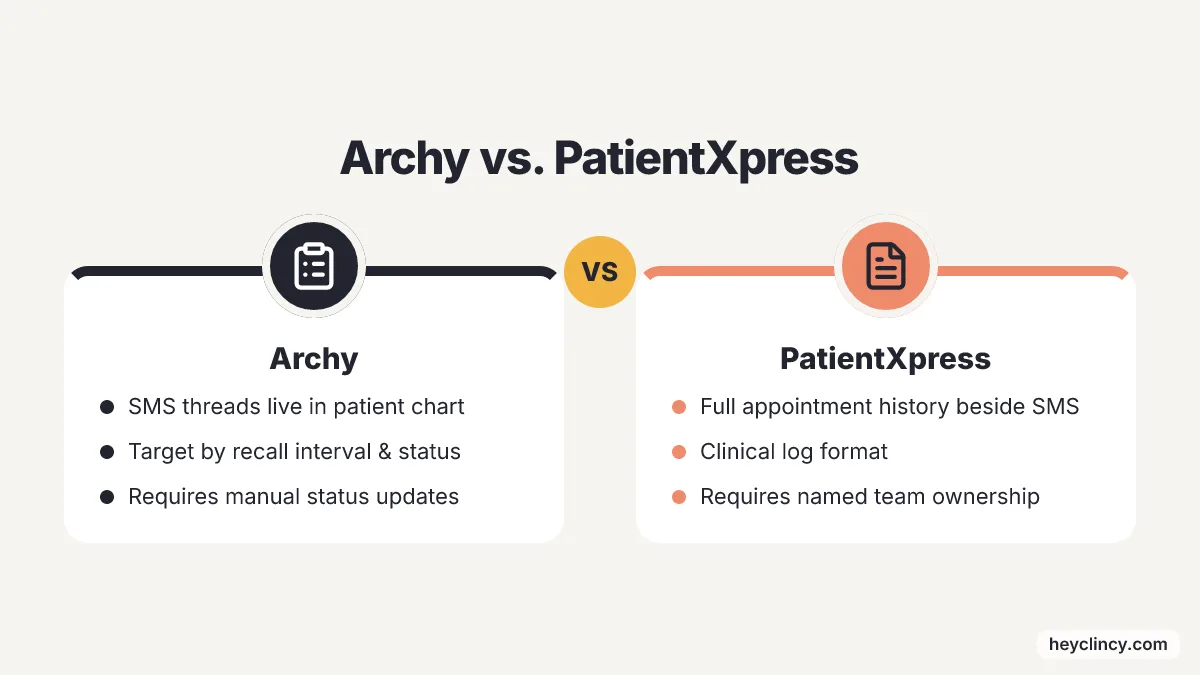
Archy dental texting software puts two-way SMS threads directly into the patient chart. Clinical teams can send targeted text batches to specific groups by hygiene recall interval, treatment status, or overdue recall date. With the thread sitting beside clinical notes and open treatment plans, Archy fits offices that care more about scheduling accuracy than raw outbound volume.
Clinical context cuts down front desk mistakes during rapid patient exchanges.
If an overdue patient texts back asking about late-afternoon hygiene availability, a scheduler can confirm the visit without leaving the chart. If that same patient asks about an unpaid balance or an estimate for planned restorative work, the conversation can move to a financial coordinator without losing the notes from earlier visits.
Chart visibility only helps when practice leadership sets rules for updating patient status. Office managers need to decide before the first batch campaign whether staff mark records as contacted, booked, escalated to treatment coordinators, or opted out. PatientXpress handles that same problem with a different setup.
2. PatientXpress: patient history beside each SMS
PatientXpress two-way text messaging turns the clinic's main landline into a HIPAA-compliant messaging portal, and it shows the patient's full appointment and communication history beside every inbound and outbound SMS. Dental teams get one communication record that reads more like an ongoing clinical log than a broken-up mobile chat thread.
Historical visibility clears up common front desk collisions when patients have several active files at once. One patient may have an unbooked hygiene visit, a delayed crown recommendation, and an overdue insurance copay all sitting there together. Schedulers who do not have the full conversation log often book the wrong appointment length or ask again about financial details that the billing coordinator already handled three days earlier.
Accountability improves across the front desk when message threads show clear employee ownership tags. Full interaction records help only when a named team member owns the work of turning each incoming reply into a booked calendar entry or a recorded clinical note. Without that, the history is tidy and the follow-through is still a mess.
3. RevenueWell: real-time texting from the practice number
RevenueWell dental text messaging allows real-time, two-way SMS exchanges sent directly from the clinic's recognized phone number. Patients answer known caller IDs much more reliably than unfamiliar short codes or temporary numbers, which makes this setup useful for quick schedule changes and routine confirmations.
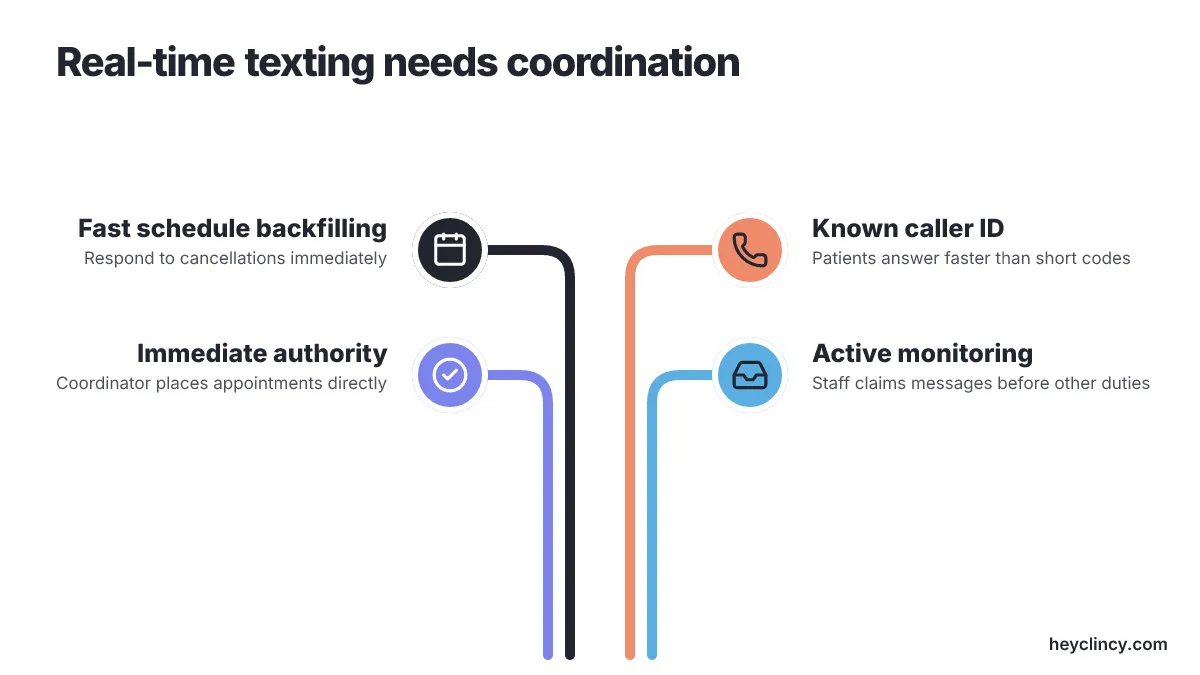
Fast schedule backfilling works better when the patient conversation happens right away. If a morning cancellation opens a two o'clock operative slot, front desk staff can text three waitlisted patients and book the first one who says yes. That pace protects chair production, as long as the responding coordinator has immediate authority to place the appointment directly on the schedule.
Real-time messaging loses momentum if the practice treats the texting tool like an unmonitored bulletin board. Offices using this system need a front desk standard that has staff claim and resolve incoming messages before they move on to secondary duties.
4. CareStack: texting built into CareStack
CareStack dental text messaging sits inside CareStack's practice management platform as a native part of the system. That means there is no need to license a separate messaging add-on, install one, or keep it synced. Practices that already run billing, scheduling, and charting in CareStack keep every patient text, incoming or outgoing, inside the same software they already use.
That shared setup cuts out the sync problems that often show up with stand-alone messaging tools. Staff who work all day in CareStack can update appointments, check clinical histories, and reply to patient texts in one browser tab, without entering the same information twice.
Offices running Open Dental or other older on-premise servers do not get much from this approach if the main aim is recall outreach and nothing else. To use one messaging channel for everything, the practice has to move onto the larger management system first. That turns a communications project into a much bigger change in how the office runs.
5. Textline: appointment reminders with HIPAA-focused messaging
Textline dental reminder software is built around automated appointment reminders that follow HIPAA rules, with the goal of cutting last-minute cancellations and reducing outbound calls from the front desk. Dental offices that want simple schedule confirmation, and not a deeper clinical reactivation workflow, get a tool centered on privacy controls. Reminder texts solve a different administrative problem than bringing back patients who have gone quiet or fallen off the schedule. A reminder checks an appointment that already exists on the calendar. Clinical reactivation asks a patient to accept treatment, settle payment questions, or book care they put off for months.
Practices running targeted campaigns for unscheduled treatment follow-up should test Textline's routing and team assignment rules before they go live. Higher-value treatment conversations need coordinator handoffs and detailed conversation logs, and those needs go beyond basic reminder functions.
6. Clinads: marketing-led patient booking support
Clinads AI-powered marketing team works as a dental and medical clinic marketing agency. It acts like an AI-driven service team that plans, launches, and manages patient acquisition campaigns to bring in new visits and raise search visibility. Clinic leaders who treat text messaging as a lead generation tool, not an internal office utility, are the ones most likely to look at it seriously.
Campaign management for marketing solves acquisition problems, not routine recall work. Clinics that want a steady stream of high-value implant or cosmetic cases can pair paid search traffic, landing page optimization, and fast SMS lead follow-up into one acquisition setup.
Practices that need software for routine hygiene reminders or overdue recall lists will find the agency model out of step with front desk work. External campaign support fits best when the office lacks new patient volume, not when it needs better coordination around overdue recalls.
How should a dental practice choose a texting tool?
Evaluating communication platforms starts by mapping what happens when a patient responds, because clinical reactivation stalls when replies linger without an owner. The ideal platform mirrors how your office distributes tasks among scheduling coordinators, treatment advisors, and front office managers.
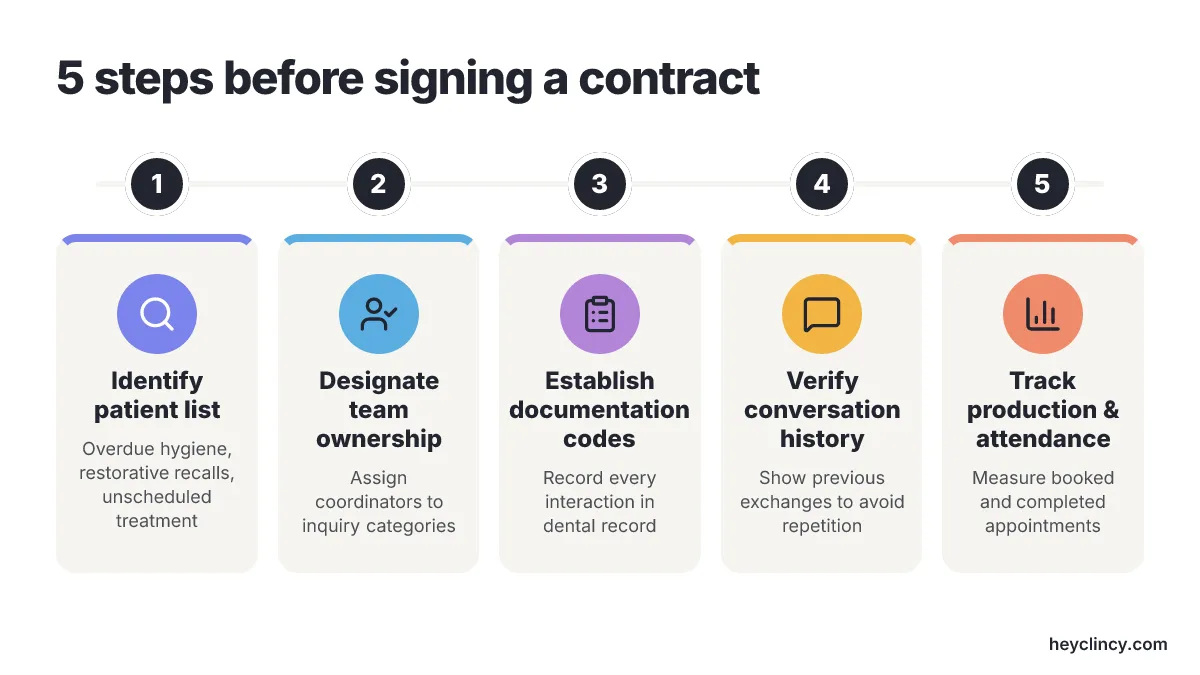
Building an operational plan requires five clear steps before signing a software contract:
- Identify your initial patient list, focusing on overdue hygiene, restorative recalls, or unscheduled treatment plans.
- Designate team ownership for specific inquiry categories before sending messages.
- Establish exact documentation codes for every patient interaction in the dental record.
- Verify that the software interface shows previous conversations to avoid repetitive outreach.
- Track completed production and attended appointments rather than outbound volume or response percentages.
Assigning message ownership dictates campaign performance far more than message phrasing. Front desk booking results can differ a great deal depending on whether scheduling coordinators claim open time requests, treatment coordinators handle financial questions, and billing specialists resolve insurance delays. Practices needing structured message language can reference Clincy's dental text message templates after assigning team responsibilities.
Dental offices on Open Dental must demand complete documentation integration across all communication points. Unrecorded text conversations lead to embarrassing staff overlap, where one employee texts a patient an hour after another employee left a voicemail for the same treatment. Clincy is building AI calls and texts for dental patient reactivation and unscheduled treatment follow-up, focusing initial pilot development on Open Dental practices to solve the gap between automated patient outreach and confirmed schedule placement.
A practice running its entire clinical and operational workflow inside CareStack should avoid layering a third-party reactivation plugin onto its front desk simply because an outside guide recommended it. Operating two disconnected systems forces employees to cross-reference multiple screens, destroying the efficiency gains that a native practice management platform provides.
Regulatory deadlines and carrier surcharges require direct attention during vendor negotiations. The FCC issued an order in January 2026 extending the compliance deadline for 47 C.F.R. section 64.1200(a)(10) until January 31, 2027, giving practices and software providers continued flexibility to apply patient opt-outs to specific message categories rather than enforcing universal revocation across all communication. Meanwhile, Tychron's carrier tracking report in October 2026 recorded Verizon's A2P outbound SMS pass-through surcharge increasing from $0.0045 to $0.005 per text, making carrier fees a necessary line item in any practice budget.
Industry mergers and technical developments also shape software stability. Weave announced in July 2026 that incoming artificial intelligence responses now flow into the inbox alongside staff messages, and Francisco Partners announced in October 2026 that it completed its acquisition of Weave Communications. Software buyers must question prospective vendors about their long-term ownership structure, pricing updates, and automated feature roadmaps.
Software demonstrations should center on an operational stress test rather than a canned sales presentation. Ask the vendor representative to track a live scenario: an overdue hygiene patient texts back with a question regarding copays, leaves the message unread for two hours, and calls the front desk directly. The system must clearly show who receives the initial text, who claims the phone follow-up, where the conversation history posts in the chart, and how the platform prevents a duplicate reminder from firing the next morning. Teams struggling with response delays can study Clincy's recommendations on handling reactivation text replies to align staff expectations before scheduling software demonstrations.
Which dental texting tool should you evaluate first?
Begin by auditing the exact breakdown point in your current scheduling workflow before contacting any software vendor. If overdue hygiene messages get buried in unmonitored queues, schedule demonstrations with Archy or PatientXpress to inspect conversation histories and team assignment controls. If routine appointment confirmations consume excessive staff phone time, evaluate Textline as a targeted reminder tool.
Prepare for vendor demonstrations by pulling twenty inactive patient records and assembling the front desk employees responsible for answering patient texts. Demand that sales representatives walk those twenty test files through a live intake simulation, tracking message routing, chart documentation, and schedule confirmation. Discontinue software evaluations immediately if the platform fails to assign clear message ownership or forces staff members to manually duplicate conversation records across multiple screens.
Frequently Asked Questions
What are the key features of text messaging tools for dentists?
The key features of text messaging tools for dentists include integration with patient records, real-time communication, and seamless integration with existing dental practice management systems. These features ensure that replies are contextually relevant and actionable, helping prevent losing patients at critical booking moments.
How does Archy improve the scheduling process for dental practices?
Archy improves the scheduling process by placing two-way SMS threads directly into the patient chart, allowing clinical teams to send targeted text batches. This integration helps schedulers confirm visits without leaving the chart, reducing front desk mistakes during rapid patient exchanges and ensuring accurate scheduling.
Why is real-time messaging important in dental practices?
Real-time messaging is important because it allows for immediate communication with patients, which is crucial for quick schedule changes and routine confirmations. This immediacy helps protect chair production by enabling staff to fill open slots quickly, provided they have the authority to place appointments directly on the schedule.
How does PatientXpress handle patient communication history?
PatientXpress handles patient communication history by turning the clinic's main landline into a HIPAA-compliant messaging portal that shows the patient's full appointment and communication history beside every SMS. This setup provides a comprehensive communication record, reducing booking errors and improving accountability across the front desk.
What should dental practices consider when choosing a texting tool?
Dental practices should consider how a texting tool handles patient responses, ensuring that replies are owned and acted upon promptly. The ideal platform should align with the office's task distribution among scheduling coordinators, treatment advisors, and front office managers, and provide visibility into previous conversations to avoid repetitive outreach.
Related reading
- Effective Dental Office Text Messaging Templates
- How to Handle Replies to Dental Reactivation Texts
- Private Practice vs. DSO Dentist: Which Fits Your Career?
- Top 6 Texting Tools for Dental Offices: Ranked by Recall
- 2 Best Dental Appointment Recall Tools to Compare
Sources
- Archy – Dental Texting Software and Two-Way Patient Messaging
- RevenueWell – Dental Office Text Messaging System for Dentists
- CareStack – Dental Text Messaging Software
- Textline – Dental Appointment Reminder Software
- PatientXpress – 2-Way Text Messaging for Dental Practices
- Weave (press release): Francisco Partners completes acquisition of Weave
Clincy keeps treatment conversations moving with personalized texts, human support, and scheduling in your practice management system.
Book CallMore from the blog
Top 6 Dental Online Intake Form Solutions Compared
Compare 6 dental intake form tools: FormDr, Yapi, mConsent, iDentalSoft, CERTIFY Health and PracticeDilly, by PMS fit, patient handoff and front-desk work.
1 Best Open Dental Patient Reactivation Software
Compare six reactivation tools by Open Dental fit, reply ownership and recall workflow, with the questions small dental teams should ask before buying.