2 Best Dental Appointment Recall Tools to Compare
Compare RecallRx and PracticeDilly on SMS/email recall, PMS scheduling sync, and front-desk handoffs before adding another patient outreach queue.
Summary: Dental appointment recall tools like RecallRx and PracticeDilly streamline patient re-engagement by automating reminders and scheduling. RecallRx excels in direct booking for practices with clear patient data, reducing front desk workload. PracticeDilly integrates recall with broader patient communication, suitable for offices managing multiple tasks. Both tools aim to enhance efficiency without adding complexity to the front desk operations.
Our directory lists 3,406 dental clinics across 1,041 cities as of November 2026, yet recall work still breaks in the same ordinary place: the front desk has today's patients in front of it and yesterday's recall list waiting in Open Dental. Staff lose production when overdue hygiene candidates, pending treatment plans, and loose phone notes sit in separate piles. That leads to repeat outreach and patient replies that slip through the cracks, a concern described by CallSphere in 2026.
A good recall tool does not keep blasting people with message after message. It takes an incoming reply, assigns it to a real team member, records the result in Open Dental, and locks in the next date on the calendar so nobody has to watch another inbox. RecallRx and PracticeDilly stand out as the two specific tools worth looking at because they focus on automated outreach instead of broad website design or ad campaigns. Clinads belongs beside that comparison rather than inside the list, since it works as a dental and medical clinic marketing agency rather than stand-alone recall software.
1. RecallRx: direct booking for re-engagement
RecallRx sends automated texts and emails to reconnect with past patients, then puts those appointments directly into the practice management calendar. It serves offices where patients just need a quick link at the right moment to take an open slot.
Conversion after contact matters more than assembling patient lists. If an office keeps clean contact fields, verified cell numbers, and accurate provider hours, direct scheduling gives immediate relief. If those records are messy, recall codes and stale chart notes blunt the result.
Giving up manual gatekeeping comes with practical risks. Direct scheduling stops the constant phone tag that eats administrative hours, a patient-access concern highlighted by CallSphere in 2026, yet the clinic still needs strict guardrails for chair times, provider matching, hygiene intervals, and coordinator checks before anyone lands on the books. That keeps schedules organized and keeps the team out of double bookings or chaotic treatment days.
2. PracticeDilly: recall plus intake and reviews
PracticeDilly handles recall texts and emails alongside online registration forms, patient reviews, and calendar syncs with Dentrix, Open Dental, and Eaglesoft. Practices that want all their patient messages under one roof get more from this setup than those looking for an isolated recall tool.
It fits clinics where the front desk handles several patient touches in a single morning. A practice on Open Dental needs to watch how recall tags, visit results, and inbound patient texts write back into the main charts.
Setup takes more work. Broader coverage cuts down on manual calls in several departments, but every new communication sequence needs clear team ownership, opt-out rules, and coordination so patients do not receive a hygiene prompt beside an unrelated coordinator message about the same appointment. Staff need daily habits, or the messages start to clash.
How to choose recall software without creating another front-desk queue
Start with the work that fails after the first message, because most recall software looks useful when the only question is whether it sends texts and emails. The harder test is what happens when a patient replies, asks for a different time, mentions insurance, declines, or calls back after seeing a reminder.
Open Dental should remain the source of truth for an office that already works from Open Dental every day, a practice-management priority reflected in Morningstar's 2026 coverage of Planet DDS's dental enterprise platform. A recall tool that sends messages but leaves outcomes outside the practice management system forces the front desk to reconcile two realities: the schedule everyone sees and the outreach log nobody trusts.
Clincy is building AI calls and texts for dental patient reactivation and unscheduled treatment follow-up, with Open Dental as its initial pilot focus. That positioning matters for offices where the hardest work is not sending the first recall reminder, but getting a patient reply back into a practical next step the team can see and finish.
Choose the recall tool only after the office names the handoff for each reply type. A simple routing map should say who handles hygiene openings, who handles unscheduled treatment questions, who updates declined outreach, and who stops contact when a patient opts out.
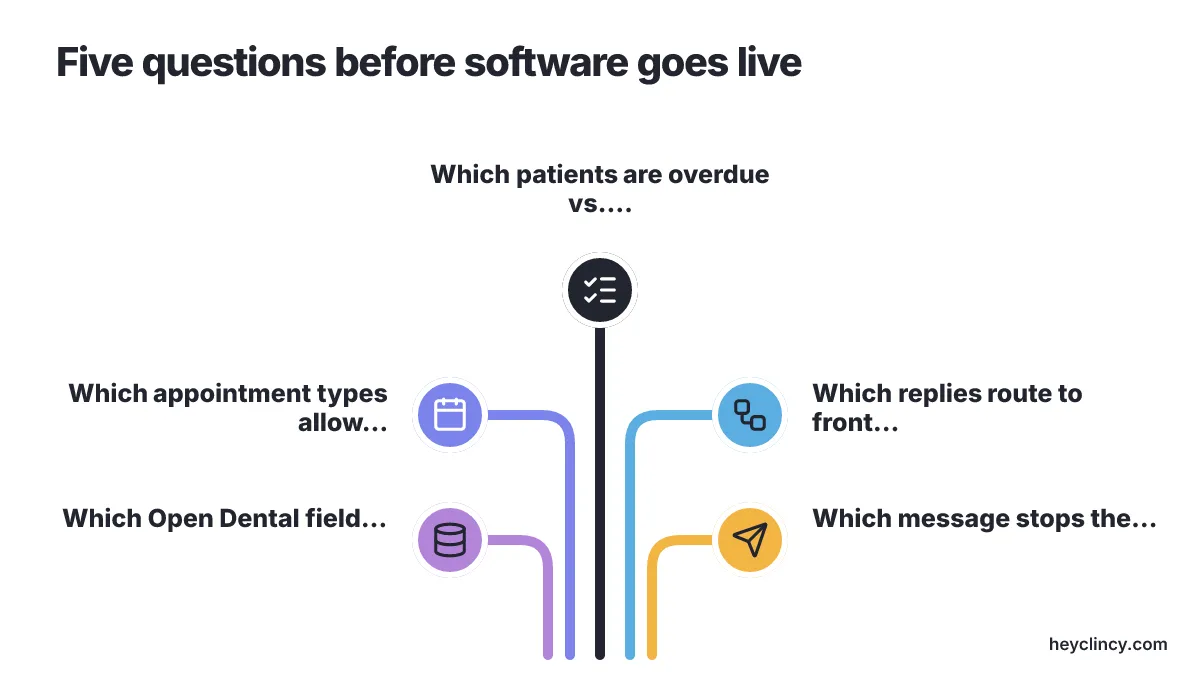
A practical recall workflow has to answer these questions before software goes live:
- Which patients count as overdue, and which patients belong in reactivation instead of routine recall.
- Which appointment types are safe for direct booking without coordinator review.
- Which replies go to the front desk, the hygienist schedule owner, or the treatment coordinator.
- Which Open Dental field records the outcome after a patient books, declines, or asks for a callback.
- Which message stops the sequence after a patient responds, so the office does not keep nudging someone who already answered.
Recall and reactivation are not the same job, and confusing them makes software feel noisier than it needs to be. A patient due for a routine hygiene visit may need a short reminder and a booking link, while a patient with a long gap or unscheduled treatment may need a different call script, a benefits check, or a coordinator follow-up. If the office has not separated those lists yet, compare the difference between recall versus reactivation before judging any tool by message volume.
Patient annoyance usually comes from duplicated context, not from a single well-timed reminder. A patient who receives a recall text, a separate treatment text, and a manual callback in the same afternoon hears the office as disorganized, even if every message was meant to help.
Duplicate outreach prevention should be part of the buying decision, not a cleanup project after launch. The office should ask each vendor where the stop signal lives, how quickly a booked appointment suppresses the next reminder, and whether a manual staff note pauses automated outreach. For a deeper workflow check, the guide to duplicate recall messages is the next place to look before connecting another message channel.
Integration proof should be specific enough for the person who works the schedule. A sales page saying a tool syncs with Open Dental is not the same as showing how recall status, appointment creation, patient replies, and cancellation changes appear for the front desk during a normal day.
A useful demo uses the practice's real scenarios rather than a generic walk-through. Ask the vendor to show an overdue hygiene patient who books, a patient who replies with a question, a patient who declines, and a patient with unscheduled treatment who should not be placed directly into a short recall slot.
Open Dental practices should also compare how each tool handles write-backs, not only how it reads the recall list. The article on dental PMS integration options is useful when the office needs to separate a light sync from a workflow that records outcomes where staff already work.
A practice with a small recall list and one coordinator who personally owns every callback should start with a shared Open Dental worklist and a protected calling block before paying for automation. Recall software earns its cost when patient replies already exceed the team's ability to respond, route, and record outcomes during the normal appointment day.
Message content still matters after the software choice. A reminder that says only "you are overdue" gives the patient too much work, while a message that names the needed visit, offers a concrete next action, and gives a callback path is easier for staff to finish. Offices building their first outreach sequence can adapt Clincy patient reactivation scripts before asking any system to send them at scale.
Non-response needs its own rule, because silence is not the same as refusal. A patient who does not answer a recall text may need a different time of day, a phone call, or a later reactivation attempt, while a patient who opts out should be removed from the sequence promptly. The guide on what to do when patients do not respond helps set that rule before reminders become background noise.
Data handling belongs in the same conversation as booking speed. Dentaltown reported in 2026 that a dental booking tool settled for $5.75 million over claims involving patient appointment information sent to Google, which is a reminder to ask where booking, phone, insurance, and visit-reason data goes before connecting patient outreach software.
Clinads belongs in the plan when recall work sits beside broader patient acquisition and local visibility. The Clinads marketing team is one AI-powered marketing team for dental and medical clinics that builds, manages, and optimizes campaigns to book patients and improve local visibility, so treat it as a marketing partner around the recall system rather than a replacement for recall software.
The final choice should come from a live workflow test, not from the longest feature list. Pull a sample of overdue patients, confirm the recall and reactivation split, test the reply handoff, and ask the front desk whether the tool removes work or simply moves work into a new inbox.
Conclusion
Before you look at any vendor, decide who belongs in the test pool. A solid recall trial works best with a small batch of overdue patients, communication preferences already checked, clear visit categories, and one staff member watching whether incoming messages turn into filled chairs on schedule. If direct calendar insertion in your current management database matters most, take a look at RecallRx. PracticeDilly is the better fit when automated notices need to sit beside intake forms, patient reviews, and wider scheduling inside your office setup.
Things break down fast when front-desk staff cannot tell who owns an incoming text. Sort out that handoff inside the office before you book sales calls. Then judge each system against real Open Dental situations, not against the number of texts an engine says it can send.
Frequently Asked Questions
What are the main benefits of using RecallRx for dental appointment recalls?
RecallRx excels in direct booking by sending automated texts and emails to reconnect with past patients, which are then directly placed into the practice management calendar. This reduces the workload on the front desk by eliminating the need for manual scheduling and phone tag, provided the practice maintains clean contact data and accurate provider hours.
How does PracticeDilly integrate with dental practice management systems?
PracticeDilly integrates recall functions with broader patient communication, including online registration forms and patient reviews. It syncs with Dentrix, Open Dental, and Eaglesoft, allowing practices to manage all patient interactions in one place, which is particularly beneficial for offices handling multiple tasks at the front desk.
What should a dental office consider when choosing a recall tool?
When choosing a recall tool, a dental office should consider how the tool handles patient replies, integrates with their practice management system like Open Dental, and prevents duplicate outreach. It's important to ensure the tool records outcomes within the system and that staff have clear roles for handling different types of patient responses.
How can a dental practice prevent duplicate patient outreach with recall tools?
To prevent duplicate patient outreach, a practice should ensure that the recall tool has a clear mechanism for stopping further messages once a patient has responded. This includes checking how quickly a booked appointment suppresses the next reminder and whether a manual staff note can pause automated outreach.
What role does message content play in the effectiveness of recall tools?
Message content is crucial for the effectiveness of recall tools. A well-crafted message should specify the needed visit, offer a concrete next action, and provide a callback path. This approach reduces the patient's workload and makes it easier for staff to complete the scheduling process, enhancing the overall efficiency of the recall system.
Related reading
- 6 Best Dental Recall Services for Small Texas Practices
- Dental PMS Integration: 6 Best Options for Recall Work
- Prevent Duplicate Dental Recall Messages: A 2026 Guide
- What to Do When Dental Patients Don't Respond to Recall
- Agency vs. Direct Dental Hygienist Hiring: Which Costs More?
- Top 6 Arizona Dental Clinics by Care Specialty and City
Sources
- Glendive, Montana Patients Will Drive an Hour for a Dentist, but They Will Not Wait on Hold | CallSphere Blog (news, callsphere.ai)
- Planet DDS Declares the Practice Management Era Over and Launches DentalOS®, the Dental Enterprise Platform for DSOs | Morningstar (news, morningstar.com)
- Dental Booking Tool Maker Settles for $5.75M Over Claims It Fed Patient Info to Google - Dental Industry News - Dentaltown (news, dentaltown.com)
Clincy keeps treatment conversations moving with personalized texts, human support, and scheduling in your practice management system.
Book CallMore from the blog
Top 6 Texting Tools for Dental Offices: Ranked by Recall
Compare 6 dental texting tools on Open Dental sync, workflows, and cost. Learn how to improve retention and manage patient replies effectively.
Text Messaging for Dentists: 6 Recall Tools Compared
Compare top dental texting tools for recall efficiency, focusing on chart context, patient history, and real-time replies. Check SMS fees and TCPA updates.