Top Dental Recare Systems for Practice Management
Compare four dental recare systems (Open Dental, Dentrix, Eaglesoft, Curve Dental) by integration, two-way SMS and recall tracking, plus how to choose one.
Summary: A dental hygiene recare system should integrate with existing practice management tools, automatically update recall lists when appointments are scheduled or canceled, and offer customizable communication channels like email, SMS, or phone calls. It should support two-way messaging for patient convenience and provide automation to reduce staff workload while allowing human intervention when needed.
A patient texts, "I can come next week," just after a recall prompt goes out, while the receptionist is already juggling three check-ins and verifying an insurance plan. Because the overdue hygiene screen still has not cleared that chart, another staff member sends the same message twenty minutes later. The patient starts wondering why nobody read the first note, and the desk team gets stuck comparing conflicting records on separate monitors.
Running a dental hygiene recare system should stop those administrative pile-ups instead of leaving the practice with a second inbox that is messy and hard to trust.
Offices see real progress when their software connects directly to the central appointment book. That setup closes pending alerts as soon as an appointment gets booked or rejected, and it still sends a plain alert to a human when somebody texts back a question the bot cannot read. Out of the box, Open Dental gives offices a workable hygiene tracking list with basic communication flags. External plug-ins add timed multi-step messages, live two-way SMS, and direct web booking links.
Vetting recare platforms comes down to watching how the front desk actually spends its day, not to trusting sales pitches. The main concern is whether incoming replies land in the scheduling database without someone retyping them.
What Features Should a Dental Recare System Have?
Live data sync with the main office management platform is non-negotiable. Phone numbers, patient charts, and calendar openings need to match continuously, which drops a patient off the recall list the minute their preventive visit gets marked on the calendar. Reaching patients through several channels, like SMS texts, standard emails, and recorded phone reminders, helps an office connect with different generations on channels they actually watch. With Two-way SMS tools, people can confirm an open chair or ask for a different day straight from a mobile device without calling the desk.
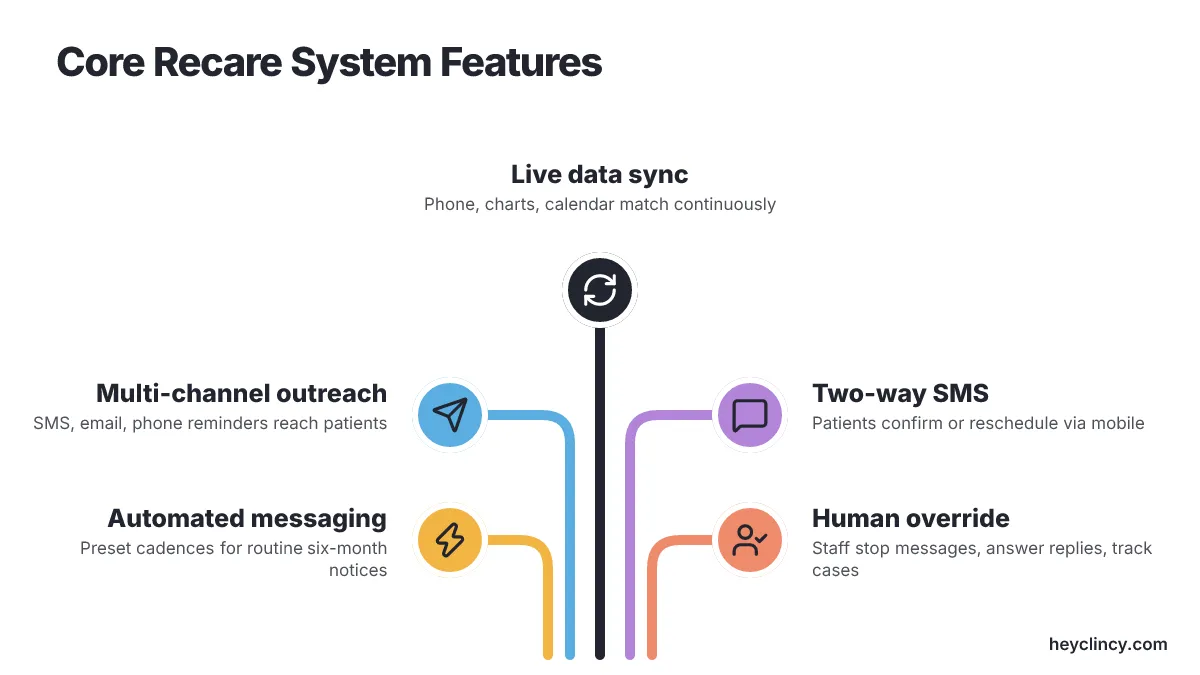
Preset message cadences cut hours of routine phone duty by sending six-month cleaning notices automatically.
Relying only on set automation brings trouble, though. Periodontal cases on alternating three-month schedules, medically involved patients, or people asking specific questions about their care need human handling. Administrative workers have to be able to stop scheduled messages, answer incoming replies by hand, and keep personal rapport intact. Detailed reporting screens need to track completed hygiene bookings, pending responses, and overdue patient recoveries so staff can see exactly where conversations fall apart.
How Does Open Dental Support Recare?
Open Dental includes a built-in recall report that helps administrators track and contact delinquent hygiene patients straight from the record system. It monitors recare intervals for adult cleanings, child visits, and periodontal care, tying those dates to open time slots on the schedule grid. Staff can mark individual charts with specific contact tags so two receptionists do not dial the same phone number on the same morning.
Offices can adjust their follow-up timelines, recall categories, and template language to fit clinical protocols and local patient preferences. When practices want broader communication tools, Open Dental's integration capabilities let external reminder services read the main appointment schedule and manage custom recall outreach (Recupra, 2026).
What Are the Alternatives to Open Dental?
Dentrix is a common choice for multi-provider clinics that want clinical charting, billing modules, and recall management in one system. Its built-in communication tools let staff send hygiene notices by text, email, or phone, and the messages pull patient history from the main database. Dentrix also connects with major third-party dental communication platforms, which makes it useful for reactivation campaigns aimed at patients who have missed several recall cycles.
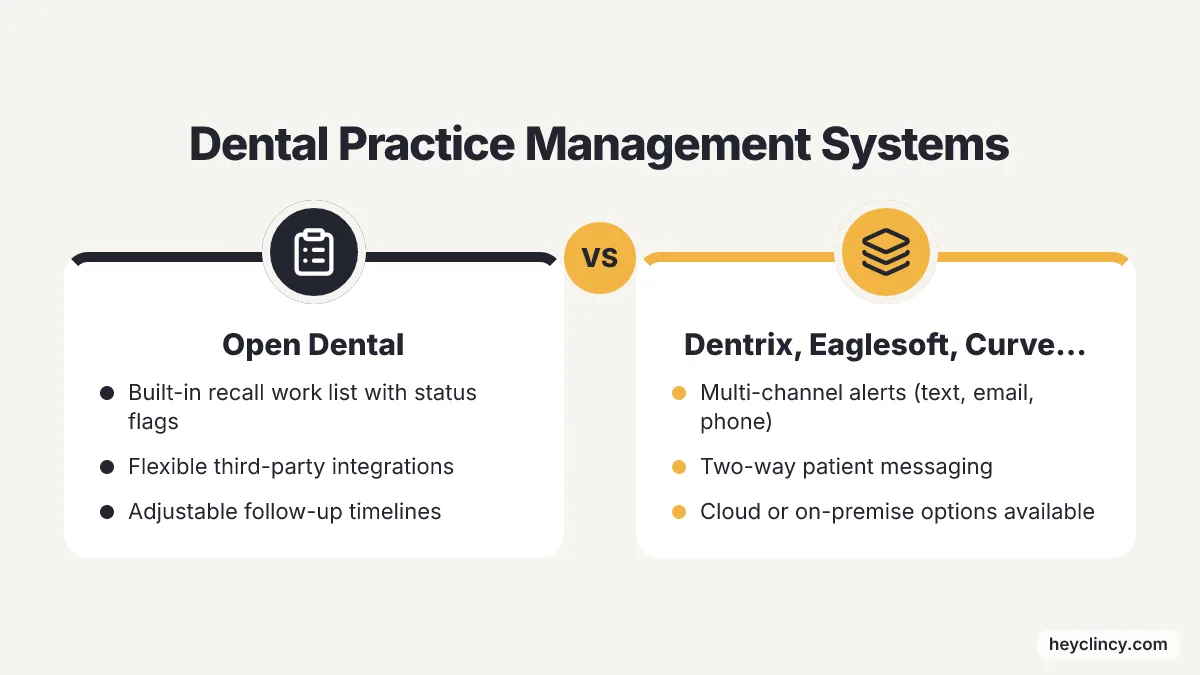
Eaglesoft is another long-running on-premise option. It combines a visual scheduling book with adjustable recall tracking lists and patient communication records. Front-office staff can use it to coordinate preventive reminders, track confirmation receipts, and handle two-way patient messaging from the workstation. Clinics with several physical sites, or teams that want web access without local server hardware, may prefer Curve Dental, which offers a fully online platform: a cloud-based platform that sends automated hygiene recall notifications and live schedule updates from any browser (Elva, 2026).
| Practice Management System | Primary Architecture | Core Recall Capability | Best Suited For |
|---|---|---|---|
| Open Dental | On-premise or private cloud | Built-in recall work list with status flags | Independent practices wanting flexible third-party add-ons |
| Dentrix | On-premise | Native multi-channel alerts and ledger syncing | High-volume single or multi-doctor offices |
| Eaglesoft | On-premise | Integrated recall tracking with two-way messaging | Established practices prioritizing visual scheduling |
| Curve Dental | Cloud-native web application | Browser-based automated reminders and live charting | Multi-location groups seeking centralized remote access |
How to Choose the Right Recare System for Your Practice
Choosing a recare platform begins with finding the bottleneck in your preventive workflow. Practices dealing with high no-show numbers need dependable SMS confirmations with calendar invitations. Practices with thousands of dormant hygiene charts need Clincy automated reactivation campaigns that stop after a set number of failed attempts. Automated booking links work well for standard six-month cleanings, while clinics that handle frequent periodontal root planing cases should have staff schedule hygiene appointments by hand so chair time is assigned correctly.
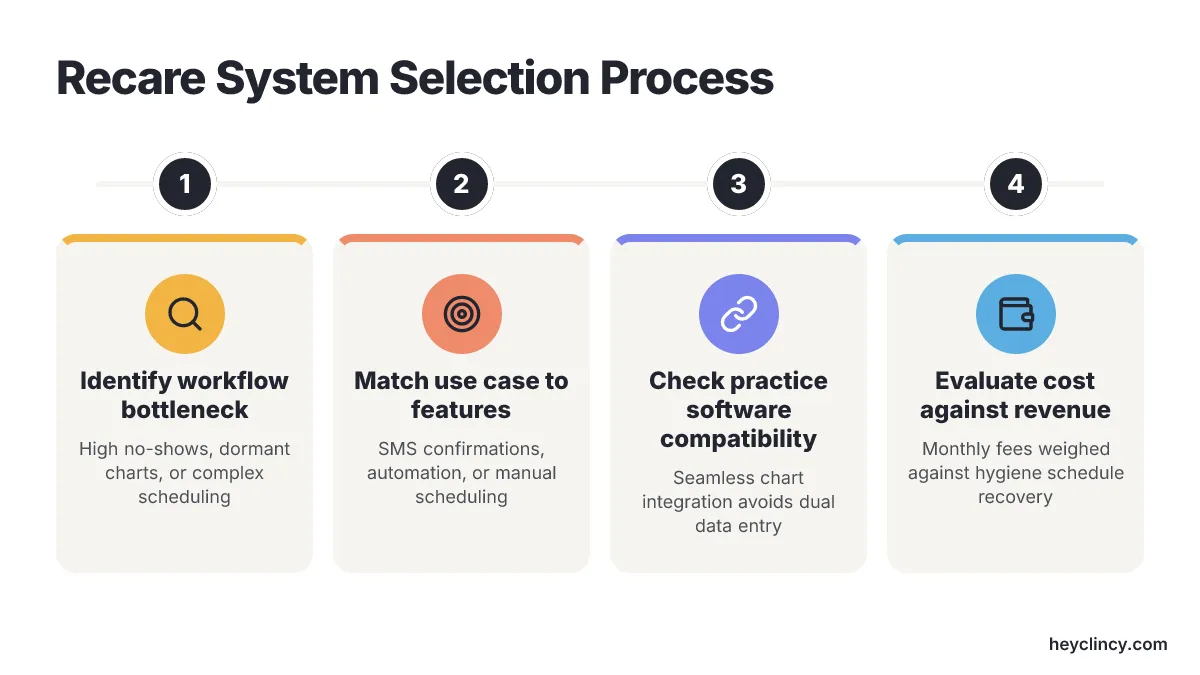
Compatibility with your practice management software decides how much daily maintenance the system creates for your staff. A recare system that does not write confirmations and notes straight into the patient chart pushes employees to copy data between two programs, and that opens the door to scheduling mistakes. The price also has to match your patient volume, so monthly subscription costs need to be weighed against the hygiene revenue recovered from fuller schedules. As highlighted in Kluse's comparison of dental recall software, weighing these trade-offs keeps the platform working for the administrative team instead of slowing their day (Kluse, 2026).
Next Steps Before Your Recare System Goes Live
This week, audit your unscheduled hygiene roster and count the patients who are more than ninety days past due. Check how your current practice management setup records patient replies, and see whether communication histories write directly into the daily appointment ledger. Pick a platform that matches your database architecture, then set aside a 60-minute training block with front-office staff so they have clear rules for manual responses and self-scheduled hygiene appointments before automated messaging goes live.
Frequently Asked Questions
What should I look for in a dental recare system?
A dental recare system should integrate seamlessly with your existing practice management tools, provide live data synchronization, and support multiple communication channels like SMS, email, and phone calls. It should also offer two-way messaging to allow patients to confirm appointments or ask questions directly from their mobile devices.
How does Open Dental facilitate dental recare?
Open Dental provides a built-in recall report that helps track and contact patients due for hygiene appointments. It ties recare intervals to open time slots on the schedule grid and allows staff to mark charts with specific contact tags, preventing duplicate calls. It also supports integration with external reminder services for broader communication capabilities.
What are the benefits of using a cloud-based recare system like Curve Dental?
Curve Dental offers a fully online platform that provides automated hygiene recall notifications and live schedule updates accessible from any browser. It is particularly suited for multi-location groups seeking centralized remote access without the need for local server hardware, making it easier to manage patient communications across different sites.
How can a recare system reduce administrative workload in a dental practice?
A recare system can reduce administrative workload by automating routine tasks such as sending appointment reminders and confirmations. It should sync with the main office management platform to ensure patient information is up-to-date, reducing the need for manual data entry. Automation also allows staff to focus on handling complex cases that require personal attention.
Why is it important for a recare system to integrate with practice management software?
Integration with practice management software is crucial because it ensures that appointment confirmations and patient communications are recorded directly into the patient chart. This reduces the risk of scheduling errors and eliminates the need for staff to manually transfer data between systems, streamlining the workflow and improving efficiency.
Recommended resource
Related reading
- Top Dental Clinic Review Platforms in the United States
- 6 Best AI Systems for Clinics in Florida, Reviewed
Sources
Clincy keeps treatment conversations moving with personalized texts, human support, and scheduling in your practice management system.
Book CallMore from the blog
Dental Patient Intake Solutions: Weave vs Solutionreach
Compare Weave and Solutionreach on digital forms, Open Dental handoff questions, and where intake ends before reactivation follow-up starts.
2 Best Dental Appointment Recall Tools to Compare
Compare RecallRx and PracticeDilly on SMS/email recall, PMS scheduling sync, and front-desk handoffs before adding another patient outreach queue.