5 Best Dental Phone Script Resources for Scheduling
Compare dental scheduling and callback script resources by call type, with sample wording, follow-up handoffs and an Open Dental selection checklist.
Summary: The best dental scheduling and callback scripts are brief routing rules that clarify what to say, what appointment options to offer, who follows up, and where to record the outcome. LINKED Dental Systems offers phone-skill coaching; Call Box focuses on scheduling objections; Ichelon Consulting structures new-patient calls; Dental Trainer connects scripts to team scheduling; Straight Consulting Partners ties callbacks to patient flow.
The callback comes in while someone is still at checkout, and the overdue recall list in Open Dental still holds yesterday's unanswered names. One patient wants to schedule dental cleaning. Another wants to know whether insurance got checked. The treatment coordinator is already tied up in a consult, so the front desk has to carry the call without stalling.
Dental appointment scheduling scripts break down when they read like speeches instead of handoffs. The better dental office phone scripts work as brief routing rules. They say what to say, what to offer, who owns the reply, and where the result goes before the next call arrives.
Dental receptionist phone script examples help only when they match the call in front of the team. A new-patient call, an overdue recall call, an unscheduled treatment callback, and a scheduling objection all call for different language, because each one asks the patient for a different next step.
How to read this comparison: These are editorial fit recommendations based on the resource descriptions linked below, not a performance ranking or a claim that any provider guarantees bookings. Match the described scope to the call your team needs to handle. The script examples are illustrative wording for adaptation, not patient stories, provider quotations, or reports of tested results.
Use a clinical explanation only when it is documented by the treating clinician for that patient; do not copy a named doctor's recommendation or a prediction about pain into a live call.
| Resource | Editorial fit | What to check before choosing |
|---|---|---|
| LINKED Dental Systems | Phone-skill coaching | Whether coaching addresses the point where your live calls stall |
| Call Box | Scheduling objections | Whether the material helps staff agree a follow-up without pressure |
| Ichelon Consulting | New-patient call structure | Whether the intake wording covers your appointment preparation and handoffs |
| Dental Trainer | Team scheduling systems | Whether training fits the appointment types and role transitions your team uses |
| Straight Consulting Partners | Patient-flow coaching | Whether the scope connects callback wording to the actual in-office visit |
Treat the fit labels as a starting point for evaluation, not evidence of comparative effectiveness. Ask what material is included, how staff practise it, and how the provider handles calls that require clinical review.
1. LINKED Dental Systems: best for phone-skill coaching
LINKED Dental Systems fits practices that want outside coaching on dental phone skills and scripting, since its stated work includes practice consulting on phone skills in Dallas, Texas. The strongest use case is a front desk that already answers quickly, then loses control when patients ask about timing, cost, or whether treatment is really needed.
A practice looking at phone-skill coaching should listen for the point where calls stall. The front desk may explain the recommended treatment, then stop when the patient asks to wait. Coaching should help the team answer plainly without pressuring the patient or making clinical claims beyond what the dentist has said.
LINKED Dental Systems fits an owner-dentist or office manager who wants the phone conversation fixed at the team level, not just a one-page script taped near the monitor. A practical scheduling script for that setting might sound like this, provided the clinical reason matches the patient's documented recommendation:
I can help with that. The doctor recommended the crown because the tooth is at risk of breaking. I have an opening on Tuesday afternoon or Thursday morning. Which works better for you?
That example works because it ties the reason for the call to an appointment choice, then stops for the patient's decision. If the patient turns down both times, the next line should ask whether they want another option or a later callback, instead of repeating the treatment explanation.
LINKED Dental Systems is less likely to be the right first move when the main problem is unworked Open Dental lists after hours. Coaching can improve the live call, but the practice still needs one owner for texts, callbacks, and reactivation outcomes.
2. Call Box: best for scheduling objections
Call Box works best once the front desk has already moved a patient toward scheduling and then hits resistance, because Call Box gives scripting techniques for scheduling objections.
The hard part is the moment after someone says they need to check a calendar, ask a spouse, or wait until next month. That pause can swallow the whole call if staff do not have a reply ready. Call Box fits a practice that wants a phone script for scheduling appointments where the patient sounds interested but has not committed yet. The original objection pattern illustrates wording that requires a patient-specific clinical check before use; do not predict pain or promise to hold an appointment unless the clinical recommendation and booking policy support that wording:
I understand you need to check. I would not wait too long, because Dr. Patel wanted this completed before it becomes painful. I can hold the time and call you if an earlier opening appears.
When the patient needs to check a calendar, the team should not treat a polite "I'll call back" as a booked follow-up. Ask whether they want a call or a text, confirm when to reach them, and write that preference next to the appointment options already discussed. The next staff member then has something concrete to do instead of a vague reminder sitting in the chart.
Call Box's objection-scripting material is a starting point for distinguishing hesitation from a request for information. "I need to check" calls for an agreed follow-up. "I'm not sure I need the treatment" may need a clinical question sent back to the dentist or coordinator. Staff should not answer treatment questions by making up a diagnosis on the spot.
Call Box is narrower than a full recall workflow. Objection scripting helps in the live conversation, but the practice still needs a documented next step when the patient does not answer or replies to a text later. Without that follow-up path, the call ends with good intentions and no action.
3. Ichelon Consulting: best for new-patient call structure
Ichelon Consulting is worth reviewing for new-patient call structure because its agency page discusses front-desk scripts. Treat appointment preparation as a requirement to check with the provider, not proof that the page includes a ready-made scheduling template.
The editorial fit is a practice that wants consistent intake expectations before anyone books the visit. Ichelon Consulting suits teams looking for a dental new patient phone call script rather than a recall or treatment follow-up script.
For your own intake checklist, identify the reason for the visit, route urgency questions through the clinical process, set expectations for records or forms, offer appointment options, and repeat what happens next before the patient hangs up. Use those requirements to evaluate the material rather than assuming any resource covers them all.
The order matters. Staff need to understand why the person is calling before choosing an appointment type. A caller asking about a routine exam needs different preparation from someone describing a problem that the practice should route for clinical review. The receptionist can collect the caller's concern and pass it to the right staff member without trying to assess the condition.
Before ending a new-patient call, the receptionist can confirm the appointment date and time, the type of visit booked, and any preparation the practice has asked the patient to complete. If records need to be sent, name that task and say who will follow up. If the patient needs to provide information before arrival, spell out the next step in plain language. That keeps the handoff clear for both sides.
Ichelon Consulting is narrower than a reactivation system. New-patient preparation protects the first visit, but an Open Dental recall list needs language for patients who already know the practice and have drifted out of the schedule. Those patients need a different kind of call, because they are not starting from zero.
4. Dental Trainer: best for team scheduling systems
Dental Trainer is a good match when the phone script is only one broken part of the schedule, because Dental Trainer offers dental-team training with scheduling and patient-flow systems in Dallas, Texas. The practical fit is a team where the receptionist, hygienist, and treatment coordinator each use different language for the same patient.
Dental Trainer suits practices that want scripting tied to the day's movement through the office. A call script in that setting should connect the phone decision to patient flow: Mrs. Garcia, your cleaning is due and Dr. Lee also wanted to recheck the upper left area. I can place you with hygiene first, then reserve time for the doctor to evaluate it before you leave.
A practice can test whether those handoffs work by tracing a scheduled visit from the first call to checkout. The receptionist should know what appointment was booked; the clinical team should know what needs attention; and the patient should not have to repeat the purpose of the visit at every handoff.
That test also helps separate a wording problem from a scheduling-system problem. If the receptionist offers an appointment that does not leave the needed time or sequence for the visit, a smoother script will not solve the mismatch. Staff need an agreed process for confirming the appointment type before promising a time.
Dental Trainer is best considered when the practice wants behavior change across roles. A single callback script will not fix a schedule if operatory timing, coordinator handoffs, and patient instructions all point in different directions.
5. Straight Consulting Partners: best for patient-flow coaching
Straight Consulting Partners fits practices that want phone language connected to the full patient experience, because it offers dental practice coaching on patient flow and the new-patient experience from Dallas, Texas. The best use case is an office where scheduling sounds polite but patients still arrive confused, unprepared, or unsure why the visit matters.
Straight Consulting Partners suits an owner-dentist who wants callbacks to set up the next in-office step, not just fill a hole in the schedule. A patient-flow script might say the following only if it matches the clinician's documented recommendation for that patient:
Dr. Nguyen reviewed the area we discussed at your last visit. The next step is a consultation so you can choose a treatment plan before the tooth becomes harder to restore. I can offer Monday or Wednesday.
The call should match the appointment that the office can actually provide. If a patient is being offered a consultation, the receptionist should not describe it as treatment already being scheduled; if the patient needs to speak with a coordinator first, the script should say who will call and what question they will address.
A practice can review a sample of completed callbacks and compare what staff promised with what happened at the visit. If patients repeatedly arrive without knowing the purpose of the appointment, the office can revise the wording or the handoff that follows the call, rather than assuming staff need to sound friendlier.
Straight Consulting Partners is not mainly a missed-call tool. The value is in connecting the wording, the appointment type, and the patient's path through the practice.
How should a dental practice choose a phone script resource?
Start with the call type that breaks most often, because one script will not cover new patients, overdue hygiene, unscheduled treatment, and missed callbacks. A practice with weak intake should start with a dental new patient phone call script, while a practice with accepted but unscheduled treatment should start with treatment callback language and coordinator ownership.
How should Open Dental teams record callback outcomes?
For each callback, record who was reached, what was offered, what the patient chose, any callback request, and the agreed follow-up date in the practice's designated Open Dental workflow. Choose the script only after the team agrees where that outcome belongs so staff can find the next action without reconstructing the conversation. Clincy is building AI calls and texts for dental patient reactivation and unscheduled treatment follow-up, with Open Dental as its initial pilot focus, which makes the handoff question central rather than optional.
A call record should let the next staff member see whether the patient booked, declined, asked for more information, or requested a later contact. If the patient did not answer, record the attempt and follow the practice's process for another contact; do not mark the patient as having declined treatment when there was no conversation.
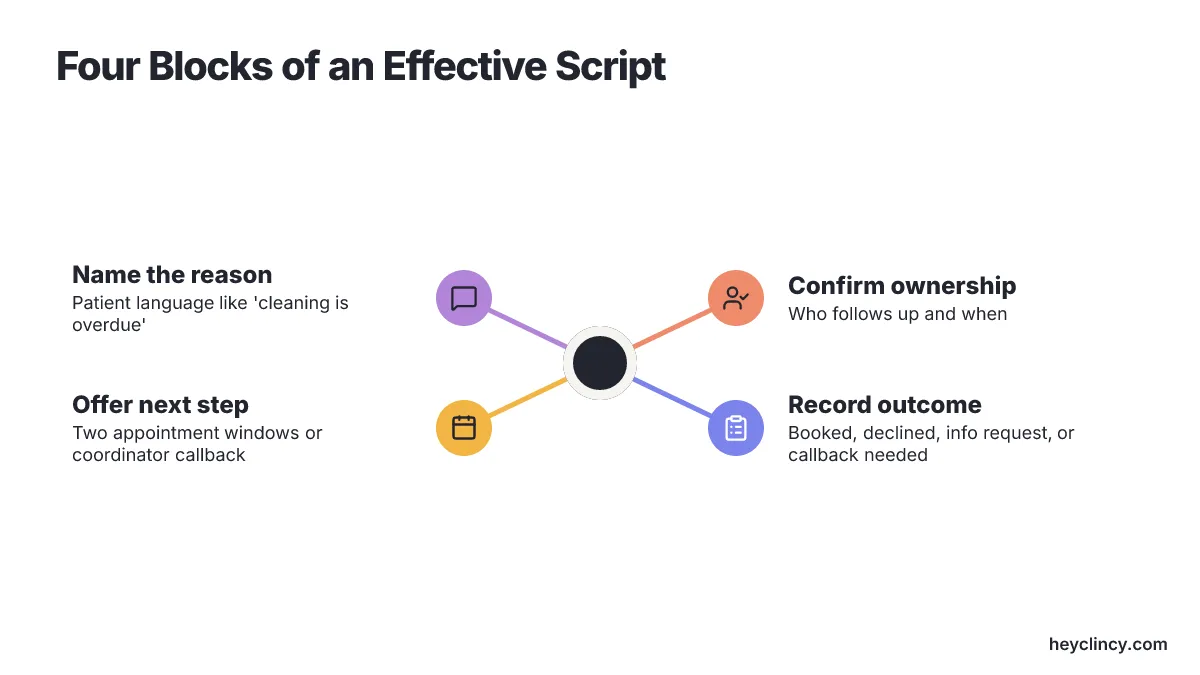
Front desk teams should write scripts in four blocks instead of full paragraphs:
- Name the reason for the call in patient language, such as your cleaning is overdue or Dr. Martin recommended finishing the crown.
- Offer a concrete next step, such as two appointment windows or a coordinator callback.
- Confirm the owner of the next action, such as I will send this to Maria, our treatment coordinator.
- Record the outcome in Open Dental before moving to the next patient.
The team should read the draft aloud before using it. A line that looks clear on paper may sound unnatural when a receptionist is also checking the schedule, and a long explanation can hide the actual choice the patient needs to make. Trim any sentence that repeats the reason for the call without adding a next step.
How does phone training differ from follow-up capacity?
Phone training addresses live-call wording; follow-up capacity covers the work queues, reply ownership, and outcome tracking needed after the call ends. A consultant can improve live-call wording, but a recall list still needs repeatable work queues, reply ownership, and a way to measure completed visits instead of only messages sent. If the practice needs wording for overdue patients before choosing software, the Clincy Dental Patient Reactivation Scripts give the front desk a practical starting point.
New-patient scripting needs a different test. The right question is whether the patient knows what to bring, what type of visit was booked, and what the office will do next. If the team is rewriting intake wording from scratch, the Clincy New Patient Phone Script is a better fit than adapting reactivation language.
What should a practice check before automating callbacks?
Before automating callbacks, confirm appointment rules, opt-out handling, and which staff member takes over when the system cannot resolve a request. In November 2026, Curve Dental announced Curve Voice, a phone system in closed beta with missed-call text-back and AI receptionist plans for routine bookings. That kind of tool raises the bar for script clarity, because automated replies still need correct appointment rules, opt-outs, and staff handoffs.
Before enabling an automated booking reply, the practice should check that the system distinguishes appointment types and knows when a staff member must take over. A routine booking request is different from a message containing a clinical concern or a request to discuss treatment. Automation can route the conversation, but the practice still needs a clear owner for anything it cannot safely resolve.
Automated outreach scripts also need a compliance review before they go live. Have the reviewer confirm the rules that apply to the proposed calls or texts, including consent, revocation, and how staff record requests to stop outreach. The linked revised robocall consent rules should not be used here as a verified interpretation of an exception or effective date. Make opt-out wording clear in the draft and have the reviewer approve it before use; do not assume that a patient's request applies only to a particular category of contact.
Safety note for callback routing: A recall, reactivation, or unscheduled treatment script should not replace the practice's clinical triage process when a caller describes pain, swelling, a broken tooth, or an injury. Pass the concern to the designated clinical team rather than trying to assess the condition or persuade the caller to take a routine appointment. The NHS guidance on dental abscess identifies a swollen face or jaw among possible symptoms and provides urgent-care instructions. Use clinician-approved escalation wording rather than treating this scheduling article as a diagnostic guide.
Visibility sits upstream from the phone script, and the fix is different when the problem is not enough qualified calls. ClinAds is healthcare marketing and healthtech: one app that analyzes your site, competitors, and AI-recommended content to boost visibility, with AI-driven website redesign, Google Maps presence, blog publishing, and branded ads. A practice should not buy scripting help to solve a discovery problem, or buy marketing help to solve unanswered callbacks.
A simple scorecard keeps the choice practical. Ask whether the resource improves live objection handling, new-patient preparation, patient-flow handoffs, or repeat follow-up from Open Dental. If the answer is unclear, the practice is likely buying general communication advice rather than a script the front desk can use during a real call.
Practices building a larger recall process should compare script language with the actual recall tool. The article on dental appointment recall tools is useful when the decision is software, while the examples in dental reactivation scripts are better when the team needs wording for overdue patients today.
Choose a script resource by the call your team needs to improve
Pick the resource that matches the call your team mishandles most often, then test the selected script under your practice's agreed review process before changing other parts of the workflow. The first version should cover the opening line, the appointment offer, the callback owner, the opt-out or preference note, and the Open Dental outcome field the team will update.
Keep the test conditions clear: note the call type, which wording staff used, and whether the agreed next action actually happened. Treat that record as an internal improvement exercise, not evidence that the wording will produce the same result for every practice.
A script earns its place only when the front desk can use it while phones are ringing and patients are checking out. Start with one workflow, such as overdue hygiene or unscheduled treatment, and review completed visits rather than message volume. Once the wording works in real calls, decide whether coaching, automation, or a broader patient-flow project is the next constraint.
Frequently Asked Questions
What are the best phone scripts for dental appointment scheduling and patient callbacks?
Choose the resource by the call type: phone-skill coaching, scheduling objections, new-patient intake, team scheduling, or patient-flow handoffs. This comparison maps those needs respectively to LINKED Dental Systems, Call Box, Ichelon Consulting, Dental Trainer, and Straight Consulting Partners; the labels describe editorial fit, not measured booking results. The best fit depends on where calls break down: live phone conversations, patient hesitation, new-patient preparation, cross-team scheduling, or callbacks that need to support the in-office flow.
Which resource helps with dental scheduling objections?
Call Box is the closest fit when a patient seems interested but hesitates over scheduling. The article describes scripting for objections such as needing to check a calendar or wait until next month. Staff can agree whether to call or text, confirm when to reach the patient, and record that preference alongside the appointment options already discussed.
What should a dental new-patient scheduling call cover?
The call should identify why the person is contacting the practice, confirm urgency, set expectations for records or forms, offer appointment options, and explain what happens next. Staff should understand the caller’s concern before choosing an appointment type, and pass clinical questions to the appropriate team member rather than assessing the condition. Before ending, confirm the appointment details and any preparation the practice has requested.
How should a dental office handle callbacks when a patient is not ready to book?
If a patient declines the offered appointment times, staff can ask whether another option or a later callback would help. When someone needs to check a calendar, agree whether the follow-up should be a call or text, confirm when to reach them, and record that preference with the appointment options discussed. This gives the next staff member a clear action instead of a vague reminder.
Related reading
- 2 Best Dental Appointment Recall Tools to Compare
- 6 Best Dental Reactivation Scripts for Front Desk Staff
- Red Flags in Dental Job Offers: What to Check Before You Sign
- Retain Dental Associates Long-Term: Relationships That Stick
Sources
Clincy keeps treatment conversations moving with personalized texts, human support, and scheduling in your practice management system.
Book CallMore from the blog
Dental Texting Platforms: Features and Pricing Compared
Compare dental texting tools on Open Dental workflows, reply ownership, consent checks and contract costs, with practical questions for vendor demonstrations.
6 Patient Follow-Up Services for Solo New York Practices
Compare six New York follow-up options by call ownership, automation fit and Open Dental handoff, plus the check Washington practices should make.