Dental Texting Platforms: Features and Pricing Compared
Compare dental texting tools on Open Dental workflows, reply ownership, consent checks and contract costs, with practical questions for vendor demonstrations.
Choose a dental texting platform by the workflow your practice needs: native messaging, a shared reply inbox, broader front-office tools, or reactivation and treatment follow-up. Compare how replies reach staff, how bookings reach the practice management system (PMS), and what the complete agreement costs: not just whether a tool sends messages.
In dental communication, sending the message is only part of the job; the reply is where the appointment either happens or doesn't. For a practice weighing dental patient communication software, the practical question is: when a patient replies, who answers, where does the booking land, and what does the first year actually cost?
Comparison method and affiliation: Clincy publishes this article and is included in the comparison. The order is not an independent performance ranking. The discussion compares workflow fit, integration questions, reply ownership, and pricing evidence from the linked material; it does not present a controlled head-to-head trial. Recupra is included as a voice-based alternative alongside texting, not as an SMS platform.
As background, Clincy's recall ranking cites a 30-day evaluation that identified 836 qualifying patients representing $2,544,990 in treatment value. That is an identified opportunity reported in a secondary account, not verified collected revenue or evidence that any platform here will deliver the same result. Use your own approved patient list and attended-visit outcomes to evaluate fit.
Clincy: reactivation and treatment follow-up
Clincy's published workflow focuses on patient reactivation and unscheduled treatment follow-up, with an Open Dental evaluation path. Treat it as a focused workflow to demonstrate, rather than assuming that automated conversations, appointment entry, and every integration are generally available for your practice.
The patient reactivation workflow describes approving the patient group and exclusions with a named front office member, choosing the permitted channel, and reviewing reply handling. This is the useful distinction to test: does a response become a scheduling request, a callback task, or a question assigned to staff? Ask which steps are automated in the proposed deployment and which remain staff responsibilities.
Who it's for: Open Dental practices evaluating an overdue-patient or open-treatment-plan workflow rather than a replacement phone system. Request a written description of supported PMS versions, scheduling permissions, available channels, and pilot terms. Do not assume that a treatment opportunity identified in a case account represents a booked appointment or an attended visit.
What to demonstrate: Before enabling outreach, run the evaluation steps in the Open Dental reactivation walkthrough: show how a callback request reaches a named person, how an outside booking stops further attempts, and where outcomes appear in Open Dental. Also inspect the exception path when a patient asks a question the automation cannot resolve. Keep the staff handoff visible in the evaluation rather than assessing only the outgoing message.
While you sort through options, you can start with the Clincy dental patient reactivation scripts to tighten manual messaging.
Weave: a broader front-office platform
Weave is the broader front-office option to evaluate when the buying decision includes phones as well as patient messaging. Compare the proposed phone, texting, reminder, scheduling, forms, and payment package as a whole, rather than assuming that everything shown in a demonstration is included in the quoted plan.
review.dental's Weave review lists a published Pro starting price of $249 per month per location. That is a secondary review's listed starting price, not a current quote or the complete cost of your deployment. Request the current vendor proposal with setup, hardware, forms, add-ons, and usage charges separated. Review-based prices and customer experiences should help frame questions, not become promises about your agreement.
Who it's for: Practices considering a wider front-office change rather than a messaging-only purchase. The key trade-off is the size of that change: compare what staff gain from a combined platform against the training, migration, and contract commitments involved in replacing existing tools.
What to demonstrate: Use the practice's actual PMS version to test the specific synchronization paths you need. Messaging, appointment changes, and payment write-back are separate tests; success in a texting demonstration does not establish that the payment workflow meets your requirements. Ask the vendor to document supported fields and the exception process.
Get a written feature list attached to the agreement at signup. Confirm renewal, cancellation, and feature-change terms in the agreement itself rather than relying on a general review's description of contract flexibility. This keeps the comparison focused on the package the practice can actually buy.
Falkon SMS: texting from an existing office number
Falkon SMS positions its offering around texting from an existing office number, with a shared team inbox and reminders rather than a replacement phone system. For a practice that mainly needs to receive and manage replies, that is a different purchase from a platform intended to run the wider front office.
Falkon's dental platform guide advertises an Essential annual-plan starting price of $14.99 per user per month. Treat that as a vendor-advertised starting rate, and confirm the plan, billing commitment, permitted use, message allowances, and number-enablement conditions in the current proposal. Compare the cost for the staff who will actually need access, including cover for absences.
Who it's for: Practices evaluating an existing-number inbox without wanting to replace their phone workflow. Ask the vendor to demonstrate number eligibility, shared-inbox assignment, and what a patient sees when replying. Avoid equating a low entry price with a complete scheduling workflow.
What to demonstrate: Have a staff member take a text conversation through to a confirmed appointment in the PMS. Establish whether staff enter the booking manually, whether an available connector moves the relevant information, and what happens if that connector fails. Verify the proposed integration rather than relying on an unqualified claim that a connection either exists or does not exist.
For patient information, request the applicable business associate agreement and security documentation for the exact service being purchased. Marketing references to HIPAA or security certifications do not, by themselves, demonstrate that sending clinical files through a particular workflow is appropriate. Have the reviewer assess access permissions, file handling, and retention before approving that use.
Recupra: voice reactivation alongside texting
Recupra is a voice-based reactivation alternative to assess alongside texting, not an SMS inbox replacement. Recupra's dental recall page describes a calling workflow for bringing patients back and filling openings; ask the vendor to demonstrate which parts apply to your PMS and proposed deployment.
Who it's for: Practices that already send recall messages and want to evaluate a call-based follow-up path for patients who have not responded. The question is whether that extra channel fits patient preferences and the staff workflow, not whether calls universally outperform texts. A non-response to a message does not, by itself, establish permission or willingness to receive another kind of outreach.
Pricing questions: Obtain the current charging model in writing. If the proposal is pay-per-result, define the billable event: a reply, an appointment booked, or a visit attended are not interchangeable outcomes. Ask how cancellations, duplicate patients, rescheduling, and appointments already arranged by staff affect billing. Include any setup, platform, or integration charges before comparing that proposal with a subscription.
Dentalbase's recall channel comparison argues that calls and texts serve different recall needs. Its channel-level discussion is not a controlled comparison of the products listed here and should not be treated as a forecast for your patient list. Evaluate the channel using the practice's own approved cohort and a clearly defined outcome.
What to demonstrate: Inspect a call outcome from the conversation through to the appointment record and staff follow-up queue. Ask how the workflow handles a patient who wants a callback, declines further outreach, or is already scheduled. Establish whether the call system and existing recall messages share stop conditions, so the evaluation covers coordination as well as the conversation itself.
Open Dental Integrated Texting: the native baseline
Open Dental Integrated Texting is the native baseline to check before buying additional dental communication software. Open Dental's own feature page describes sending and receiving texts through its eService and warns that text messages are not a secure method of sending protected health information (PHI).
dentalsupplierguide's comparison of 17 offerings reports an Open Dental rate of $0.04 per message. Confirm the current access fee, bundle eligibility, and message charges directly before budgeting; a per-message figure alone is not the complete service cost. The linked comparison is a secondary pricing source, not your practice's agreement.
Who it's for: Practices evaluating whether the PMS's own messaging functions cover their reminder and reply-handling requirements. Start by inspecting the functions already available in the practice's configuration, then identify what would still need a separate tool or a staff procedure. Native access is a baseline for comparison, not proof that every desired automation is included.
When evaluating dental patient engagement software, the practical question is staff workload: who prepares the messages, checks the replies, enters appointments, and handles exceptions? Record those tasks during the demonstration and compare them with the proposed alternative. A separate platform needs to solve an identified gap rather than merely provide another view of the same patient list.
What to demonstrate: Follow an incoming reply to the patient record and show how the responsible staff member notices and resolves it. Inspect reminder configuration and the handling of patients who have already scheduled. Keep Open Dental's PHI warning visible in message-writing guidance; ordinary text delivery should not be mistaken for an approved channel for sensitive treatment details.
RevenueWell: recall and marketing automation
RevenueWell is the recall and marketing-automation option in this comparison, rather than a texting-only purchase. Evaluate the campaign tools and the incoming-reply workflow together so that a broad feature list does not obscure the specific task the practice needs to complete.
PracticeSignal's 2026 comparison lists a Starter price of approximately $189 per month. Treat this as a secondary source's listed starting price, not confirmation that the current package includes all messaging functions. Request a current proposal identifying the plan, any texting or Virtual Office add-on, and the services included in implementation.
Who it's for: Practices comparing recall and reactivation campaigns as part of a wider marketing workflow. Ask the vendor to demonstrate the proposed channels, patient selection rules, and PMS connection for the practice's actual setup. A familiar ecosystem name does not establish which fields synchronize or whether staff can complete the required booking task.
What to demonstrate: Have staff follow a campaign reply into the inbox, assign ownership, and complete the appointment or callback workflow. Ask which steps depend on an add-on and whether the same permissions and conversation history remain available across those steps. Inspect what happens when a patient opts out or books through another channel.
If conversation handling is the priority, compare the complete quoted package against Weave and a focused reactivation workflow rather than comparing advertised entry prices. Confirm contract length, cancellation, renewal, support, and export arrangements in writing. This avoids turning a secondary comparison's snapshot into an assumption about the agreement your practice will sign.
How to compare them: the four checks that decide it
Compare each platform on synchronization, complete cost, reply handling, and stop conditions; use the table as a demonstration checklist, not a guarantee of availability or price. The detailed sections above distinguish vendor descriptions from secondary pricing snapshots.
| Platform | Open Dental workflow to test | Pricing question | Workflow focus | Agreement question |
|---|---|---|---|---|
| Clincy | Demonstrate booking and outcome handling | Request pilot quote | Reactivation and treatment follow-up | Confirm pilot terms |
| Weave | Test each required write-back path | Request complete package quote | Front-office messaging and reminders | Confirm renewal and cancellation |
| Falkon SMS | Demonstrate booking handoff or connector | Request quote for intended users | Existing-number texting and shared inbox | Confirm billing commitment |
| Recupra | Demonstrate call outcome and booking flow | Confirm charging model and billable event | Voice-based reactivation | Confirm result and cancellation definitions |
| Open Dental native | Native messaging; test required workflow | Confirm access and message fees | PMS messaging baseline | Confirm eServices terms |
| RevenueWell | Demonstrate the required integration | Confirm Starter and texting add-on quote | Recall and marketing campaigns | Confirm in writing |
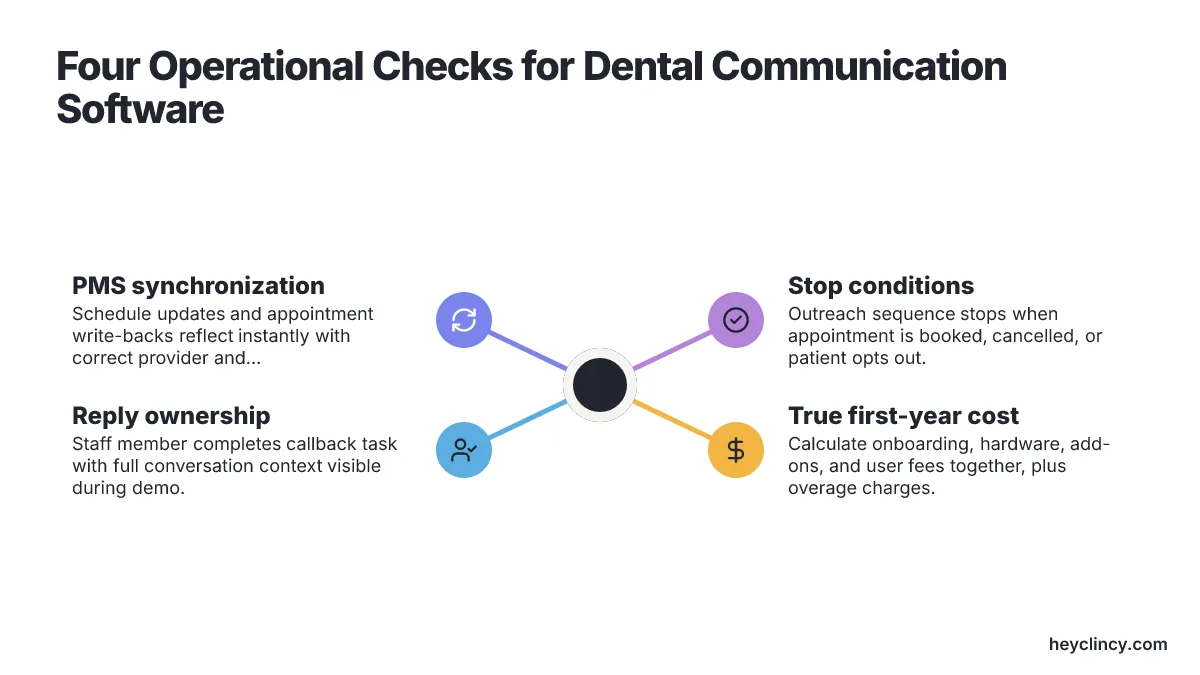
Run every candidate through these operational checks in a demonstration, not just on the pricing page, as Clincy's ranking article recommends:
- PMS synchronization. Change an appointment inside Open Dental and inspect how the change appears in the messaging software. If the vendor offers booking write-back, demonstrate the correct provider, appointment type, and procedure information. Ask which direction each field moves and what staff do when synchronization fails; do not treat an integration logo as proof of a complete workflow.
- Reply ownership. Have a staff member complete a callback task from their own account with the conversation context visible. Inspect reassignment, unanswered messages, and staff absence. A screen showing that a task exists is not proof that someone owns the answer. Agree on the person responsible for checking the queue and the backup arrangement before outreach begins.
- Stop conditions. Demonstrate an appointment booked outside the outreach conversation and inspect whether the remaining sequence stops. Include a cancelled booking and an opt-out in the test. Ask what happens when the same patient appears in separate campaigns, and inspect the record staff use to understand why another message was or was not sent.
- Complete agreement cost. Compare onboarding, phone hardware, add-ons, user fees, message allowances, and overages together rather than comparing base stickers. Ask how billing changes when the team grows or usage rises. Include cancellation, renewal, data export, and any required support agreement in the written comparison, even when the sales demonstration concentrates on features.
Privacy and consent checks: Determine whether the vendor is acting as a business associate and what contractual safeguards apply. HHS business associate contract guidance is a primary starting point; a vendor's security label alone does not establish that your proposed workflow meets its obligations. Have the appropriate reviewer assess the agreement, access controls, message content, and use of patient information before launch.
Consent requirements depend on the message and how it is sent. Use the FCC's guidance on unwanted calls and texts when reviewing consent and opt-out handling, rather than treating a generic legal penalty as a universal cost per message. PracticeSignal's compliance notes offer secondary context, not a substitute for review of the actual campaign. Ask where permission records are stored and how a patient's request to stop is applied across outreach workflows.
For the message itself, keep recall and reactivation as separate lists: a patient due for a planned hygiene visit needs a different conversation from someone with an open treatment plan, as the recall versus reactivation comparison lays out. Review the selected group and exclusions before sending, and inspect a sample of messages for clarity and unnecessary personal information.
How to choose a platform for your practice
Start with the demo, not the price list. Pick one candidate, request a demonstration on an approved test record from your own Open Dental reactivation list, and run the four checks: write-back, reply ownership, stop conditions, and first-year cost. Assign a named owner to the reply queue before any outreach goes live, and agree on an evaluation window with success measured in attended visits, not replies.
What this list does not settle is how a conversation sounds on your practice's line and how your patients respond to it; that only shows up in your own pilot data. If you want the full patient flow before the demo, the unscheduled treatment follow-up page covers the second half of the workflow.
Frequently Asked Questions
How much does dental patient texting software cost?
Dental texting costs depend on the package, user access, message charges, and billing commitment; compare written quotes rather than assuming the entry price covers your workflow. Falkon's guide advertises Essential annual-plan pricing from $14.99 per user per month. review.dental's review lists Weave Pro from $249 per month per location. These are sourced starting-price snapshots, not guaranteed current offers. For Open Dental, confirm access and message fees together; for Clincy, request the applicable pilot terms. Include setup, add-ons, overages, renewal, and cancellation in the comparison.
Which dental texting platform works with Open Dental?
Open Dental offers native Integrated Texting, and Clincy publishes an Open Dental reactivation evaluation workflow. Start with the native feature documentation, then compare the additional workflow you need. For every external candidate, demonstrate the practice's PMS version, incoming-reply handling, appointment entry, and exception process. A listed integration does not establish that every scheduling or payment field moves in the required direction. Confirm supported functions in writing before treating a demonstration as an implementation commitment.
Can dental texting platforms book appointments automatically?
Do not assume that a texting feature includes automatic booking; require a demonstration of the exact scheduling path offered in your proposal. Ask whether a reply creates an appointment, a scheduling request, or a staff callback task. Test appointment details, outside bookings, cancellations, and unresolved questions. Clincy's Open Dental evaluation steps provide a workflow checklist, not evidence that every deployment offers the same automation. Compare the demonstrated result with the written scope.
What should practices check before choosing a dental texting platform?
Check synchronization, reply ownership, stop conditions, and complete contract cost. Have the staff member responsible for the queue demonstrate the workflow instead of assessing only a sales screen. Include an unanswered message, a callback request, an appointment made elsewhere, and an opt-out. Ask where each outcome appears and who resolves exceptions. Separately review consent records, access permissions, and the applicable vendor agreement. These checks distinguish a completed staff workflow from a feature that merely sends a message.
Is Open Dental Integrated Texting secure for patient information?
Open Dental's documentation warns that text messages are not a secure method of sending PHI. PHI means protected health information. Review message content and the permitted workflow before sending; do not assume that routine delivery makes sensitive information safe to include. Ask the practice's privacy reviewer to assess the proposed use, staff access, and any alternative channel for information that should not go into an ordinary text. Apply the warning to actual templates, not just the purchasing checklist.
Patient-safety boundary: Do not design an unattended reply queue as an urgent-care pathway. As part of deployment review, define how staff identify and escalate clinical or urgent messages, who owns that handoff, and what patient-facing instructions apply when the inbox is not monitored. This comparison evaluates software workflows, not clinical triage.
Recommended resource
Related reading
- 3 Best Dental Two-Way Texting Tools by Workflow
- Top 6 Texting Tools for Dental Offices: Ranked by Recall
- Red Flags in Dental Job Offers: What to Check Before You Sign
- Alternatives to job boards for finding dental roles
Sources
- Best Patient Communication Software for Dental Practices (2026): PracticeSignal
- Weave Review (2026): The Front-Office Standard, Loved at Demo, Grumbled About at Renewal
- Best Texting Platform for Dental Offices
- Dental Recall System That Books Overdue Patients | Recupra
- Open Dental: Integrated Texting Feature
- Dental Recall Calls vs SMS: What Brings Patients Back | Dentalbase
Clincy keeps treatment conversations moving with personalized texts, human support, and scheduling in your practice management system.
Book CallMore from the blog
6 Patient Follow-Up Services for Solo New York Practices
Compare six New York follow-up options by call ownership, automation fit and Open Dental handoff, plus the check Washington practices should make.
3 Best Dental Two-Way Texting Tools by Workflow
Compare texting tools on recall ownership, unscheduled treatment follow-up, and Open Dental handoffs, so replies become scheduled next steps.