3 Best Dental Two-Way Texting Tools by Workflow
Compare texting tools on recall ownership, unscheduled treatment follow-up, and Open Dental handoffs, so replies become scheduled next steps.
Summary: Dental two-way texting helps practices manage patient replies and turn them into scheduled next steps with clear ownership and visible contact preferences. Weave suits dental-first communication, Solutionreach connects texting with confirmations and scheduling intent, and Podium focuses on fast responses and follow-up. Compare them by testing staff handoffs, Open Dental documentation, opt-outs, and duplicate outreach.
An overdue recall list does not by itself show that patients left because they were unhappy. The visit that slips away usually starts smaller. Nobody owns the callback, the text reply sits in a shared inbox, or the treatment coordinator never sees the yes hiding in yesterday's messages.
Dental two-way texting should not be judged by message volume. The practical choice is the platform that gives each patient reply an owner, keeps contact preferences visible, and turns the reply into a scheduled next step inside the workflow your front desk already uses.
A good texting setup has to spare the front desk from duplicate outreach as much as it creates patient replies. That matters most when Open Dental holds the overdue patients and unscheduled treatment plans, but the people answering phones are also checking in patients and filling today's schedule openings.
1. Weave: best for practices comparing dental-first texting
Weave for dentistry offers two-way texting for dental practices from Lehi, Utah, so it belongs on a shortlist when the buying question is dental patient communication rather than generic healthcare texting. The main reason to evaluate Weave is fit. An office manager can ask about recall list handling, appointment-related replies, and how the inbox separates routine responses from callbacks that need a coordinator. Independent practices should look at Weave when the front desk wants a texting product that speaks the language of dental offices. The trade-off is simple enough. A product described around dental communication still needs proof in your own workflow, especially if overdue patients, unscheduled treatment, and incoming calls are handled by different people.
A focused demo should begin with ownership, not a screen tour. Have the vendor show how staff would identify the patient, read the reply in context, decide who needs to respond, and record what happened. If the demo cannot make those steps clear, ask the office manager to map the handoff before comparing price or convenience.
Decision point: ask Weave to show how a patient reply moves from text thread to confirmed appointment, assigned staff member, and Open Dental note before judging the monthly cost.
2. Solutionreach: best for patient texting with scheduling intent
Solutionreach dental texting offers two-way patient texting for dental practices out of Lehi, Utah. Its dental case study centers on two-way texting and reducing no-shows. That makes Solutionreach worth a closer look if the front desk wants patient conversations tied to confirmations, reminders, and schedule behavior rather than isolated messages. The case study gives one practice a specific thing to examine, but the outcome should not be read as a prediction for another office. Ask what the case measured, what texting workflow the practice used, and whether the reported no-show figure refers to a period or a group of appointments. Those answers help separate a useful example from a promise about your own schedule.
Solutionreach also moved further into AI-assisted scheduling in August 2026, when Stella AI receptionist was announced for forwarded calls and inbound texts that show scheduling intent. A practice comparing Solutionreach should separate the core two-way texting workflow from the AI layer, because the daily risk is not only missed messages, it is a patient who says yes and then waits too long for a human handoff.
For a practical test, use a patient who texts a preferred day and also asks an insurance question. The office should be able to tell whether the scheduling request can move ahead, who handles the insurance question, and whether the patient receives a clear response while that question is being checked. Do not assume an automated scheduling feature answers every question in the thread.
Decision point: ask Solutionreach to demonstrate what happens when an overdue patient texts back with a preferred day, an insurance question, and a request to speak with the office.
3. Podium: best for fast patient response and follow-up
Podium customer story describes a messaging platform that lets a dental practice respond to patients and follow up by text, and Podium is based in Lehi, Utah. Podium fits the practice that wants the reply channel to feel immediate, especially when patients are replying between work, school pickup, and the time the front desk can return calls.
Podium should be judged around conversation control rather than message volume. A front desk coordinator needs to know which replies need a callback, which replies can be scheduled, and which replies belong with the treatment coordinator because the patient is asking about cost, timing, or a plan they never booked.
Use the customer story as a prompt for questions rather than evidence that every practice will have the same workflow. Ask the vendor to show a conversation from the first patient message through follow-up, then identify where a staff member can see the reason for the outreach. A useful demo should make it possible to tell an appointment question from an unresolved treatment discussion without relying on someone remembering a separate text thread.
A practice should also test what happens when the original staff member is unavailable. If another person takes over, the thread should make the patient's request and the last action understandable without requiring the patient to repeat the whole conversation. Ask the vendor to demonstrate that handoff using a realistic example from your own recall or treatment follow-up work.
Decision point: ask Podium to show how follow-up texts stay connected to the original patient need, so the same person does not receive a recall text, a treatment text, and a reminder from different staff members.
How to choose a dental two-way texting platform
Start with the work queue, not the sales pitch. A practice dealing with overdue patients and unscheduled treatment has to know who sends the first text, who handles the reply, where the result gets recorded, and when the thread ends.
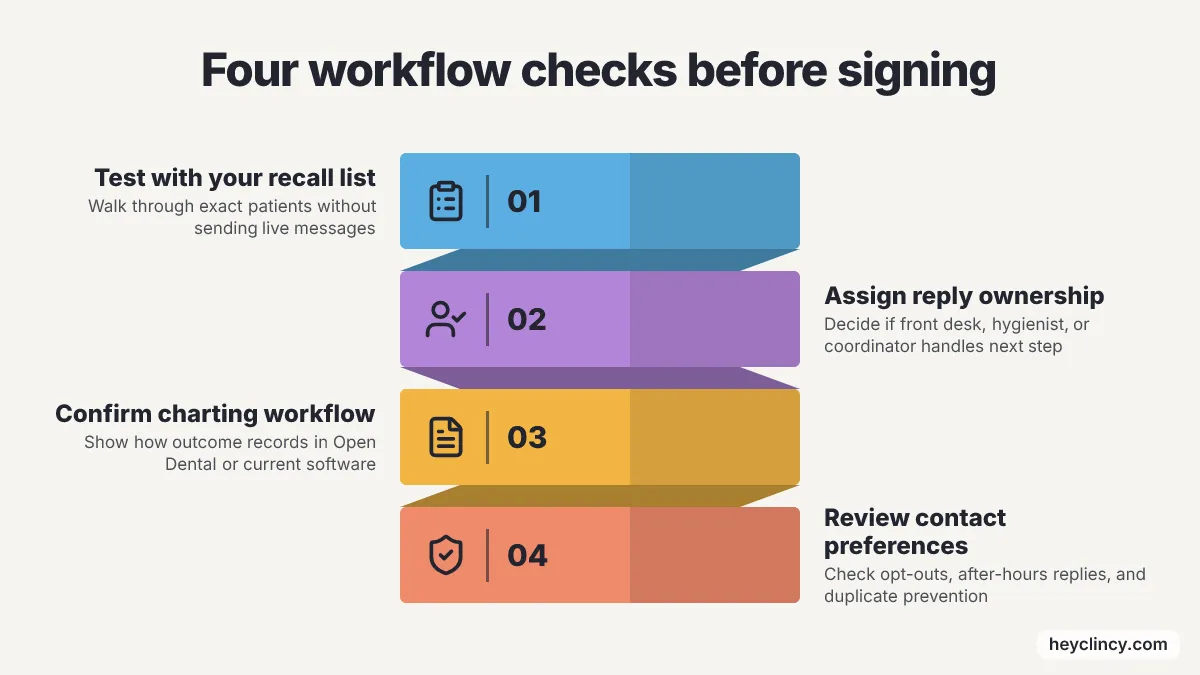
A dental two-way texting platform should clear four workflow checks before anyone signs a contract:
- Pull the recall list or treatment follow-up list you already use, then ask the vendor to walk through those exact patients without sending a live message.
- Pick one common patient reply, such as yes, what times do you have, and decide whether the front desk, hygienist, or treatment coordinator owns the next step.
- Confirm how the staff member records the outcome in Open Dental or the practice's current charting workflow, because a scheduled visit and an attended visit are different operational results.
- Review opt-outs, contact preferences, and after-hours replies before launch, because patient annoyance usually starts when the office cannot tell who already answered.
A fifth check matters too, whether staff can tell which list prompted the message. A patient with overdue hygiene care and accepted but unscheduled treatment may sit in more than one work queue. During the demo, ask how staff would check the reason for contact before sending another message, and how they would stop a second outreach after the patient responds. Contact preferences belong inside scheduling, not in a compliance box at the end. A patient who prefers text still needs a callback path for a treatment estimate. A patient who asked not to get messages should not be pulled into a bulk recall campaign because the list was exported in a hurry.
Treat hipaa compliant texting as a procurement question with written answers, not a badge on a sales slide. The office manager should ask where message history is stored, who can read it, how opt-outs are handled, and what information staff should avoid placing in a text thread.
A useful procurement record can stay short. Write down the vendor's answer about message access, opt-out handling, after-hours replies, and the staff member responsible for unresolved questions. Then have the person who will manage the inbox review those answers before signing. A feature that sounds suitable in a sales conversation still needs a clear owner in the office.
A doctor appointment reminder text does one job. Reactivation does another. Reminder texts protect visits that are already booked, while reactivation asks an overdue patient to restart care, choose a time, and sometimes explain why they have been away.
That difference should shape the test list. Use one example of a booked appointment for a reminder workflow and a separate overdue patient for reactivation. If the vendor treats both as the same sequence, ask how staff can recognize which message is being sent and what action a reply should trigger. Generic healthcare texting language can hide a dental workflow problem. Dental offices need separate handling for recall, hygiene overdue lists, unscheduled treatment, emergency callbacks, and payment or insurance questions, because each one has a different owner inside the practice.
Buying sms for healthcare also needs a clear rule for replies that arrive after the front desk closes. A patient who texts yes after dinner should not wait until the next afternoon because nobody checked the inbox, but the office also should not promise scheduling coverage that staff cannot support. Set the after-hours rule before launch. Decide whether the system should acknowledge receipt and tell the patient when staff will respond, or whether a designated staff member will monitor replies. The office should only promise the response it can actually provide, and the vendor demo should show how staff can find those messages when the office reopens.
Manual texting is the better first step for a small, time-boxed hygiene recall project where one trained person sends the messages, answers replies the same day, and records every outcome before leaving. Automation earns its cost when the office has more lists than the front desk can work cleanly, or when callbacks and texts are already being duplicated by different people.
A manual pilot also gives the team a chance to refine message wording and decide which replies need a call. Keep the test limited to one existing list, designate the staff owner, and record whether each patient booked, declined, asked for a call, or did not reply. Those categories give the office a concrete workflow to bring into a vendor demo rather than asking staff to imagine how a new inbox might work.
Open Dental practices should be especially careful about the gap between a reply and a recorded outcome. Yapi-DoctorLogic's June 2026 announcement said its Treatment Plan Reminders add-on sends automated texts for accepted but unscheduled treatment and supports Open Dental, Dentrix, Ascend, and Eaglesoft, which shows how much buying attention has moved toward the unscheduled treatment list itself. The product announcement is a reason to ask a precise compatibility question, not to assume every texting vendor handles the same list. Ask how a practice identifies accepted but unscheduled treatment, whether staff can see the patient's response alongside the treatment plan, and where the outcome is recorded. Use the practice's own software and workflow during the test so the answer is specific to the office.
AI is now part of the texting conversation, but AI does not remove the need for ownership. Annie's August 2026 announcement described a digital coworker for dental teams that expanded into recare, confirmations, and cancellation management, while Invoca's October 2026 announcement described a healthcare data and AI solution connecting calls, texts, and marketing inquiries to appointment outcomes for dental groups and DSOs. Those announcements describe different kinds of work, so a practice should not treat "AI" as a single capability. Ask which message types the system handles, when a staff member takes over, and how the office can review a conversation that did not lead to a booking. If a patient asks for something outside the automated workflow, the handoff should be clear before the practice sends messages at scale.
Clincy is building AI calls and texts for dental patient reactivation and unscheduled treatment follow-up, with Open Dental as its initial pilot focus. The practical difference is narrow but important: a reactivation workflow should care less about blasting reminders and more about turning patient replies into confirmed next steps the front desk can trust.
ClinAds is a Dental & Medical Clinic Marketing Agency and one AI-powered marketing team for dental and medical clinics that builds, manages, and optimizes campaigns to book patients and improve local visibility. ClinAds belongs in the broader patient acquisition conversation, while the tools in this list are being evaluated for two-way texting conversations after a patient is already known to the practice.
A recall-specific comparison can help when the practice wants more vendor names before narrowing the list. Clincy's roundup of texting tools for dental offices is the better next read when recall workflow is the main buying lens rather than general patient messaging.
Scripts should be written before software is purchased, because the platform cannot fix a vague message. A practice can test tone, timing, and handoff rules with the Clincy Dental Patient Reactivation Scripts before asking any vendor to automate a sequence.
A useful draft should say why the office is reaching out and make the next action easy to understand. Keep separate wording for a hygiene recall and an unscheduled treatment follow-up, then decide what staff should do when a patient asks a question rather than choosing a time. The script and the handoff rule belong together. Otherwise, staff can send a clear message and still leave the reply unresolved.
The best demo is a working session with real categories from your practice management system. Bring one overdue hygiene list, one unscheduled treatment list, and one example of a patient who replied but did not book, then ask the vendor to show the exact staff path from message to completed visit.
Use the same scenarios with each vendor so the comparison reflects the office's work rather than different sales presentations. Take notes on who sees the reply, who owns the next step, how the patient's contact preference is respected, and where staff record the outcome. If the vendor cannot demonstrate a step, mark it as an unanswered buying question instead of assuming the workflow exists.
Conclusion
Start with one list that already exists in Open Dental, preferably overdue hygiene or unscheduled treatment, and assign one staff owner for every reply before sending anything. A texting platform only pays off when the office knows who answers, who books, who records the outcome, and who stops the sequence once the patient has a next step.
The first vendor conversation should be a workflow test, not a feature tour. Ask Weave, Solutionreach, or Podium to walk through the same patient scenario, then compare the handoff, the reply queue, the opt-out handling, and the outcome record. The advice stops at purchase readiness: pricing, contract terms, data review, and legal approval still belong in your own practice's buying process.
Frequently Asked Questions
Which dental two-way texting tool is best for my practice?
The best fit depends on the work your practice needs to manage. Weave is worth evaluating for dental-first communication and clear staff ownership. Solutionreach connects texting with confirmations and scheduling intent, with its AI scheduling layer considered separately from core texting. Podium focuses on fast responses and follow-up. The article recommends testing each in your own recall and treatment workflows rather than choosing by message volume.
How should I compare dental two-way texting tools in a demo?
Use your own recall or treatment follow-up examples, and ask the vendor to show how a patient reply is identified, assigned to a staff member, and turned into a next step. Test a reply that asks for available times and one that includes another question, such as an insurance question. Also check how staff can see the reason for outreach and prevent duplicate messages.
Do dental two-way texting tools document replies in Open Dental?
The article does not claim that every tool documents replies in Open Dental. It recommends asking vendors to demonstrate how a reply moves through the workflow and how the outcome is recorded in Open Dental or the practice’s current charting process. Include a scheduled visit and an attended visit in your evaluation, since they are different operational results.
What should a dental practice check before launching two-way texting?
Before launch, review opt-outs, contact preferences, and after-hours replies, and decide who owns unresolved questions. Check how staff can tell which list prompted a message, especially when a patient appears on both a recall list and a treatment follow-up list. The office should also ask where message history is stored, who can read it, and what information staff should avoid putting in a text.
Is a dental appointment reminder text the same as reactivation?
No. A reminder text supports a visit that is already booked. Reactivation reaches out to an overdue patient to restart care and choose a time, and the patient may also explain why they have been away. The article recommends testing these as separate workflows: use one example of a booked appointment for reminders and a separate overdue-patient example for reactivation.
Related reading
- Top 6 Texting Tools for Dental Offices: Ranked by Recall
- Relocating for a Dental Role: Planning Your Move
- Alternatives to job boards for finding dental roles
- Dental Texting Platforms: Features and Pricing Compared
Sources
Clincy keeps treatment conversations moving with personalized texts, human support, and scheduling in your practice management system.
Book CallMore from the blog
Best Patient Reactivation Tools for Dental Practices
Compare dental reactivation software by reply handling, booking workflow, pricing model, and Open Dental fit, with practical checks for your vendor demo.
6 Dental Reminder Text Tools and Templates for Front Desks
Compare six dental reminder template sources by timing, reply handling and Open Dental fit, with a front desk checklist for reducing duplicate outreach.