Dental Patient Intake Solutions: Weave vs Solutionreach
Compare Weave and Solutionreach on digital forms, Open Dental handoff questions, and where intake ends before reactivation follow-up starts.
Summary: A dental patient intake solution should collect forms and route completed submissions to a clear staff owner, with a usable handoff into scheduling, not leave follow-up in an unchecked queue. Evaluate Weave against phone-heavy front desk tasks and Solutionreach against appointment-specific form needs; treat those as demonstration scenarios, not verified performance rankings. Compare them by testing staff review, missing-field follow-up, and how information reaches the chart or scheduling workflow.
Consider this hypothetical registration scenario: a new patient fills out registration on a smartphone, calls the front desk with a benefit question, and then misses the return call while a receptionist types carrier names again into the practice management system. By afternoon, the front desk team cannot tell which insurance details have been checked, who owns the follow-up, or whether the morning slot is still open. The submission arrived, but the patient never made it onto the operative schedule.
Patient intake management software should remove manual transcription and send completed records straight to one accountable staff member, instead of dropping information into an inbox nobody watches. Before buying intake software, specify who owns the submission queue rather than assuming that forms alone will fix scheduling gaps. Practices running Open Dental need to check where patient data lands, who gets the alert, and how fast an intake turns into a confirmed chair.
Disconnected intake and communication queues can leave front desk coordinators repeating work; use a demonstration to find out whether that would happen in your office. A clean registration form falls flat when employees copy health histories, recheck contact preferences, or guess who owns the next outreach. A live demonstration exposes the operational handoff, and that is where the real difference shows up.
Dental Patient Intake Software: Choose the Right Handoff
This comparison uses workflow fit as an evaluation framework, not a scored product test. The scenarios below are proposed checks for your staff; they do not establish that either vendor includes a feature in every package or performs better in practice.
| Evaluation question | Weave demonstration focus | Solutionreach demonstration focus | Evidence to record |
|---|---|---|---|
| Where does a completed submission appear? | Follow the form into the reception workspace used for calls and texts. | Follow the selected appointment packet into the staff review queue. | Destination screen, staff owner, and next action. |
| How are incomplete answers handled? | Try following up while viewing the patient's communication history. | Try correcting an incomplete packet without sending unrelated questions again. | What the patient sees and what staff must do manually. |
| What reaches the practice management system? | Trace the submitted fields and attachments into the chart. | Trace the answers from different packets into the chart. | Fields transferred, attachments stored, and review still required. |
| Who maintains the workflow? | Identify who handles form alerts during a busy phone shift. | Identify who selects, edits, and retires appointment packets. | Named staff responsibilities and a fallback when the owner is absent. |
A comparison note should distinguish what the vendor demonstrated, what its documentation says, and what still needs confirmation. A polished patient screen alone does not answer the handoff questions.
Weave: evaluate digital forms for a phone-heavy front desk
Evaluate Weave for a phone-heavy front desk by testing whether a dental new patient phone intake form connects to the call records and texting workflow your staff actually use. The documentation on the Weave digital forms page describes electronic intake paperwork built for dental teams. Use the vendor's digital forms documentation as a starting point, then confirm the features included in the proposed package.
Front desk leaders evaluating this software need to look at how patient responses appear inside daily reception work, not judge form graphics alone. For a high-call practice, a useful test is whether intake alerts appear alongside text threads, appointment reminders, and incoming caller profiles, rather than in a disconnected queue.
Office managers evaluating new-patient intake should ask who gets notified when a form arrives, who tracks missing policy numbers, and whether front desk staff can review medical history before they pick up the phone. Straight answers to those questions show whether a submitted form triggers immediate action or stalls in an inbox.
Reception teams can test this workflow during a vendor demonstration by sending in a form that intentionally leaves out a required dental insurance field. Front desk staff should see where the omission appears and send a follow-up text without clicking through unrelated message categories. Repeating that exercise with a complete document will show whether employees can separate ready-to-bill records from submissions that need clarification.
Demonstrations need to focus on the employee workspace, not linger only on what the patient sees on a smartphone. Practice administrators should ask sales representatives to show where an incoming submission appears, how the system links it to an existing chart, and which button marks the file as verified. Use that screen to check whether the process depends on staff remembering to visit a disconnected web portal.
Practices looking for automated recall recovery or unscheduled production tracking will find that intake forms do not solve those scheduling gaps by themselves. Offices targeting overdue hygiene appointments or unaccepted treatment plans need dedicated follow-up systems, and they should treat forms as one link in the larger administrative chain. Comparing how adaptable form builders handle different appointment types helps determine whether a flexible system is needed.
Solutionreach: evaluate forms across changing workflows
Evaluate Solutionreach against different appointment packets by asking staff to demonstrate the question sets needed for restorative consults, pediatric exams, and emergency visits. Review Solutionreach's digital intake forms information, then ask which fields, packets, and routing rules can be changed in the package under consideration. Keep the vendor's intake documentation alongside the demonstration notes so staff can distinguish advertised features from workflow details they have actually seen.
Clinical administrators who are thinking about that flexibility should check their actual workflow needs before they build a huge library of questionnaire templates. Consider custom questionnaires when appointment types call for different health disclosures or financial agreements, and have the responsible team approve the contents. Teams that collect anesthesia histories, guardian consents, or coverage checks should see whether alternate templates send answers to specific operators or just add clutter to administrative queues. A good software walkthrough shows how front desk workers pick the right packet for an incoming appointment and confirm that answers land with the right clinician.
Assign staff responsibility for selecting each questionnaire variation and handling exceptions before deciding that the additional setup work is justified. Administrative teams should map every required variation on paper before they create new digital versions, and each question should connect to a concrete clinical or billing action. When a procedure needs specific legal language, the practice protocol has to name who checks the signature and what happens if the patient sends back the document unsigned.
Use a questionnaire audit to identify redundant digital documents rather than creating a new packet for every minor variation. Managers should list every appointment category on the schedule, isolate the data fields that change between those visits, and identify the team member responsible for acting on each field. Before removing apparently unused questions, confirm whether they serve a clinical, billing, consent, or administrative requirement and record the team's decision.
A general practice using a standard packet should evaluate whether branching templates address a real registration problem. If the same information is needed for routine appointments, ask staff to compare the work of maintaining separate versions against the work of reviewing a shared packet; do not assume customization will save time. That overhead should be weighed against real clinical requirements, which brings up the larger problem of how software moves captured answers into the active schedule.
How should a dental office choose between intake tools?
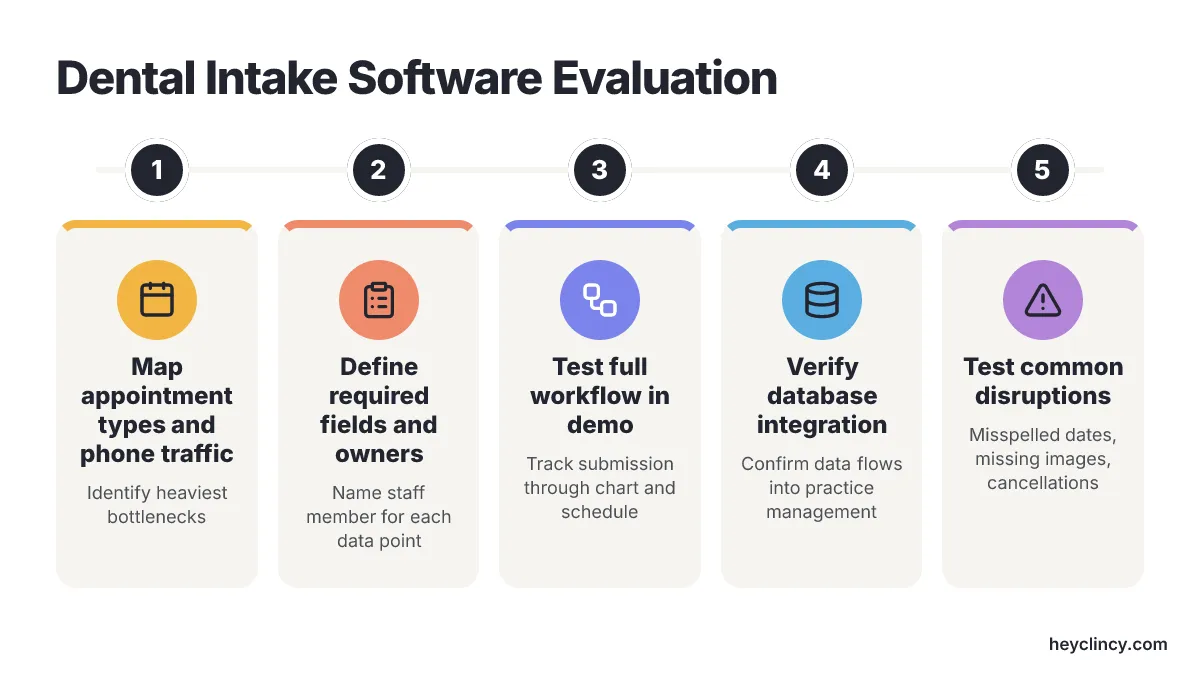
Choose between intake tools by testing how submitted information reaches the chart, who reviews exceptions, and how staff confirm the appointment. Software comparisons often fixate on patient-facing appearance, yet the friction lands on administrative staff when submissions sit untouched and chairs stay open. The review should start with the appointment types that create the heaviest phone traffic and verification work.
A new patient dental intake form should collect personal identifiers, medical history, primary coverage numbers, and signed acknowledgments. For returning patients, have the clinical and administrative teams define which information needs updating rather than assuming the new-patient packet or a brief update is always appropriate.
Practices refining their question lists can refer to a Clincy new-patient intake form template before they sit down for booking software demos. Remove a question only after the team confirms that it has no required clinical, billing, consent, or administrative purpose; keep the reason for retaining each field clear.
Which fields and chart handoffs need verification?
Verify where each required field lands in the chart and who checks it before staff rely on the record. Administrative managers should draw a hard line between required clinical items and background details the practice merely wants on file. For every field on the screen, leadership must name the staff member who reads it and the immediate task tied to it. That distinction keeps forms from swelling with idle questions that slow chart entry and make check-in clumsy.
Dental practices operating Open Dental must look at database synchronisation before they look at visual styling. Front desk staff lose time if an intake tool makes them retype medical alerts, move PDF attachments between windows, or build duplicate patient profiles by hand. A live demo should show submitted answers flowing straight into medical history alerts, progress notes, and communication logs inside the practice management system.
Clinical staff should trace a realistic test file through the whole process during the demonstration. The vendor must show where a flagged heart condition appears on the daily schedule, how allergies update the main alert screen, and whether staff can pull uploaded insurance cards without digging through separate message folders.
Who handles incomplete forms and patient replies?
Assign responsibility for incomplete forms and patient replies, then test how staff see and resolve an open task. If specific fields do not reach the required chart tabs, document the manual review or entry step and decide whether that limitation is acceptable for the practice's workflow. Accountability for patient text replies needs explicit ownership rules because front desk personnel often split intake review and schedule management. A prospective patient might upload a medical history, text a question about co-pays, miss an outgoing phone call, and then ask for a different morning appointment by SMS. Administrative teams need visible assignment tools that send each incoming message to one staff member rather than leaving unresolved requests in a shared company inbox.
Communication tracking must be checked beside data capture because collecting health disclosures depends on steady patient engagement. Front desk coordinators need software that records patient preferences for SMS, email, or telephone calls while updating submission status in real time. Test whether a completed submission stops further form reminders and whether staff can review or correct the status before sending another message.
What should other product announcements prompt you to check?
Use other product announcements to identify questions about treatment-plan records, outside documents, and booking triggers; verify each capability in the proposed package rather than assuming it transfers to Weave or Solutionreach. The Google Play listing for the Adit Patient Forms app describes presenting treatment plans alongside forms. That description is not proof of how a particular practice's consent or acceptance workflow operates. Ask the vendor to show how intake details, treatment-plan presentation, signatures, and staff review connect, and record any steps that remain outside the app.
Third-party medical record portability adds another variable to front desk workflows. An Intake Dental announcement distributed through EIN Presswire describes Dental Passport for intake as a record patients own. Treat that as the vendor's description, not an independent assessment of portability.
Ask how records are shared with participating and other practices, which formats arrive, and what permissions and review steps apply. Practices evaluating intake platforms must define which employee verifies outside records and where those documents get archived in the patient ledger.
Automated booking engines are another direct trigger for digital intake documents. Powervox's description of digital forms links the workflow to AI-receptionist bookings in Open Dental and describes syncing submitted information to the patient file. Confirm current availability, supported practice management systems, and subscription terms rather than treating an announcement as proof that a feature is included in a particular offer. Open Dental clinics need to verify whether form distribution starts from an actual calendar appointment, an unconfirmed inquiry, or a manual staff button, because each trigger sets a different verification timeline.
Practice management software suites offer another path besides standalone intake subscriptions. The linked Henry Schein One Dentrix Ascend announcement is a document to review with the vendor, not verification here of card-photo extraction or any particular package entitlement. Ask for current documentation and a demonstration before relying on those capabilities. Dental group practices evaluating bundled platforms must weigh setup overhead and staff adjustment against whether the integrated features solve their daily bottleneck.
Does dedicated software address the practice's actual bottleneck?
Compare dedicated software against the existing registration process and documented intake problems, rather than buying on patient volume alone. Document how staff handle a standard PDF or paper checklist, where they enter the information in Open Dental, and which review steps would remain after a software purchase. Base the decision on observed exceptions, staff effort, patient access needs, and the proposed implementation work, not an unsupported volume cutoff.
Evaluate specialized intake software against documented problems such as unreturned paperwork, missing insurance cards, and unclear task ownership; do not assume that a new platform will create a financial return. Software demos should follow the practice's normal administrative sequence instead of a vendor's prepared sales pitch. The representative should show how a new patient gets the registration link, how incomplete health fields generate alerts, how completed files route to a specific desk, and how the resulting data appears in the schedule. Testing the full path shows whether the software saves time or simply moves administrative labor somewhere else.
Test common front desk complications using fictional records rather than actual patient information:
- A mistyped birthdate: check how staff correct the record and avoid creating a duplicate profile.
- An insurance form without a card image: check how staff request the missing attachment and keep the task visible.
- A form arriving after cancellation: check whether the submission remains linked to the correct patient without restarting an unwanted reminder sequence.
- A text question instead of a completed questionnaire: check who owns the reply and how the unresolved form appears in the queue.
Record what happens on screen and which actions the receptionist must take. Treat these as test cases, not claims that every platform supports the desired behavior.
Record how staff resolve those disruptions during a busy-shift scenario before judging whether the workflow fits the office. Practice growth efforts often involve outside marketing partners. Clinads operates as one AI-powered marketing team for dental and medical clinics, building and refining patient acquisition campaigns to improve local visibility and chair bookings. Patient intake software handles the next step once marketing generates patient interest, so clinic leadership must define who manages the handoff from marketing inquiry to form completion and schedule confirmation.
Dental practices focused on recalling past patients need a different toolset from new-patient registration software. Clincy develops automated calling and text communication for dental reactivation and unscheduled restorative care, focusing its initial pilot integrations on Open Dental practices. When a clinic's main production gap comes from overdue hygiene visits rather than registration bottlenecks, testing the patient reactivation workflow and pilot addresses the root cause before adding more form software.
Diagnostic follow-up needs tracking that goes beyond intake questionnaires. A completed medical history does not show whether a patient agreed to an indirect crown, reviewed financing options, or booked an operative appointment. Practices following pending treatment recommendations should separate form processing from an active unscheduled treatment follow-up process that moves unconfirmed treatment into production.
Offices comparing multiple platforms should apply the same functional standards to every contender. Looking at a broader comparison of dental online intake form solutions helps when a practice looks beyond Weave and Solutionreach. For every prospective software product, staff should record where the completed file lands, who answers inquiries, and how records merge into the central database.
Form composition still matters after a software provider gets selected. Reviewing curated dental patient intake form examples helps teams that have chosen an intake platform but still struggle with convoluted questions, confusing mobile layouts, or slow data review steps. Check whether patients can understand each question and whether staff can act on the answers; assess completion and review effort in your own workflow rather than assuming a time saving.
Patient outreach scripts work separately from registration software. When receptionists contact overdue patients or follow up on pending crowns, they need structured verbal and text messaging, and the Clincy Dental Patient Reactivation Scripts support that clinical communication far better than making the onboarding form longer. Keeping intake and reactivation as separate procedures leaves front desk duties organized and measurable.
What should the quote and rollout cover?
Ask for a written scope covering package features, integration responsibilities, data handling, implementation work, and exit arrangements before treating a successful demonstration as a purchase decision. Apply the same questions to both vendors so the comparison reflects the proposed setup rather than different sales presentations.
- Package and cost scope: Ask which form, messaging, attachment, and integration functions are included and which are optional. Request the complete quote, including setup, training, support, usage conditions, and renewal terms. This article does not establish current pricing or a return on investment.
- Integration ownership: Identify who configures field mappings, checks existing patient matches, handles failed transfers, and supports the connection when a practice management system changes. Separate automatic updates from attachments and from information staff must enter manually.
- Patient access: Test the packet on the devices patients use and ask what happens when someone cannot complete it digitally. Have staff demonstrate how an assisted or paper submission enters the same review process without becoming an invisible exception.
- Privacy and permissions: Ask who can see health histories and uploaded cards, how access is granted and removed, and whether staff activity can be reviewed. Request the applicable security and data-handling documentation for qualified review; a feature demonstration is not a compliance assessment.
- Rollout and maintenance: Identify the practice's packet owner, the staff training needed, and how template changes are approved. Agree how staff will report missing fields, confusing questions, and failed notifications, and how changes will be checked before they affect patients.
- Export and exit: Ask how forms, attachments, and review records can be exported if the practice changes systems. Confirm usable formats, any contract conditions, and who is responsible for verifying that exported records are complete.
Keep a shared comparison record with columns for the requested workflow, the vendor's answer, what staff observed, remaining manual work, and unresolved questions. An item should remain unconfirmed until the practice has the documentation or demonstration it needs; silence in a sales presentation is not evidence that a capability exists or is absent.
Choose by the intake handoff your staff can verify
Map out your practice's active registration paths on paper before scheduling a single vendor software demonstration. Track a recent new-patient file, an annual health history update, and a patient coverage inquiry through the office, recording exactly who handled the data, where notes were saved, and how long the patient waited for a response.
Schedule live demonstration sessions with Weave and Solutionreach using those specific scenarios. Require both vendors to show how missing fields alert your front desk, which screen records staff verification, and how approved information transfers into your appointment schedule. Have the specific team member who manages check-in sit at the keyboard to assess whether the screen layout fits daily reception work.
Software evaluation ends where patient communication shifts toward diagnostic care. Intake tools exist to collect and file patient records; recalling dormant charts and closing unscheduled treatment plans require separate operational protocols and dedicated accountability.
Frequently Asked Questions
Which dental patient intake solution is better for a phone-heavy front desk?
Weave is a candidate to evaluate for a phone-heavy front desk, not a verified winner for every office. Use the demonstration to establish whether its forms fit your call-record and texting workflow, including where intake alerts appear relative to text threads, appointment reminders, and caller profiles. In a demonstration, check who receives form notifications, how staff follow up on missing insurance information, and whether submissions connect to an existing chart.
Is Solutionreach a good dental patient intake solution for different appointment types?
Solutionreach is an option to evaluate when appointment types need different packets; confirm the available customization and routing controls during a demonstration. Different question sets may suit restorative consultations, pediatric exams, and emergency visits when those appointments require distinct health disclosures or financial agreements. The article also cautions that customization takes active management: map appointment categories and required fields first, and identify who reviews each answer before building many templates.
What should a dental office test during a patient intake software demo?
Test the staff handoff, not just the patient-facing form. Submit one form with a required insurance field missing and check where staff see the omission and how they send a follow-up text. Then submit a complete form and see whether staff can distinguish it from records needing clarification. Ask the vendor to show where submissions appear, how they link to a chart, and how staff mark information as verified.
What should Open Dental practices verify in a dental patient intake solution?
Open Dental practices should check where submitted data lands, who receives an alert, and how quickly staff can act on it. In a live demonstration, trace a test file and ask to see answers flow into medical history alerts, progress notes, and communication logs. Also verify whether staff can access uploaded insurance cards and whether specific fields can be pushed into chart tabs without retyping or creating duplicate profiles.
Related reading
- Top 6 Dental Online Intake Form Solutions Compared
- 6 Best Dental Patient Intake Form Examples to Copy
- Top 6 Artificial Intelligence Solutions for Illinois Clinics
- Evaluating Dental Pay: Salary, Production, and Real Earnings
Sources
Clincy keeps treatment conversations moving with personalized texts, human support, and scheduling in your practice management system.
Book CallMore from the blog
2 Best Dental Appointment Recall Tools to Compare
Compare RecallRx and PracticeDilly on SMS/email recall, PMS scheduling sync, and front-desk handoffs before adding another patient outreach queue.
Top 6 Texting Tools for Dental Offices: Ranked by Recall
Compare 6 dental texting tools on Open Dental sync, workflows, and cost. Learn how to improve retention and manage patient replies effectively.